
Wix .fetch
Wix .fetch
Getting Information
Information is continuously changing - things like hit song charts, the stock market, and the weather are in constant flux. For any information to be relevant, it has to stay up-to-date. Now, imagine if you had a site that maintains the prices of stocks to help you make better trading decisions.
To implement this process, we could create a full backend application that continually tracks stock prices on top of our frontend website. Even so, this complex solution could take days, weeks, or even months to complete. Another solution is to manually create a website that tracks stock prices in real-time, however, we would have to constantly update the website’s stock prices which is just not feasible.
Instead, a practical solution is to “ask” other existing websites for stock price information to avoid reinventing the wheel and cut down on development time. This handy solution is where thewix-fetchmodule comes into place.
The wix-fetch Module
For traditional web development, theJavaScriptFetch APIis used to make data requests to other websites. Wix has streamlined this complex process through its very ownwix-fetchmodule, which makes it even easier to access and use the data that is returned from other websites.
Thewix-fetchmodule comes out-of-the-box with two important functions:fetch()andgetJSON().
- Wix’sfetch()method is used on both the frontend and the backend to retrieve the specified resource from the network.We’ll cover more in a later article, but sometimes, these requests must bemade via the backend.
- ThegetJSON()function is used on the frontend and retrieves the specified resource from the network in the JSON format.
In this article, we’ll focus on learning how to use Wix’sgetJSON()function to easily request data.
The getJSON() function
To understand why thegetJSON()function is invaluable to our Wix websites, we must first learn the basics of JavaScript Object Notation (JSON). Put simply, JSON is a text syntax used for storing and exchanging data between the browser and server where each data object can contain multiple name/value pairs. This standardized format allows data to be stored in a predictable way so that when we request this data, we know what to expect and how to use it.
{  "stocks": [    { "stockName": "Apple", "price": 393.43 },    { "stockName": "Walmart", "price": 131.47 },    { "stockName": "Tesla", "price": 1643.00 }  ]}
Copy to clipboard
{ "stocks": [ { "stockName": "Apple", "price": 393.43 }, { "stockName": "Walmart", "price": 131.47 }, { "stockName": "Tesla", "price": 1643.00 } ]}Above is an example of JSON containing astocksarray of three different stocks’ information.
Like other features of Wix, thegetJSON()function handles the complexity behind the scenes by allowing us to easily retrieve JSON from a specified location using aGETrequest. The GET request is the “ask” that enables us to retrieve data from other websites.
Implementing getJSON()
To retrieve JSON data from the specified location, we use the following boilerplate syntax in the Wix Code Panel:
import { getJSON } from 'wix-fetch';
getJSON('https://someapi.com/api/someendpoint')
Copy to clipboard
import { getJSON } from 'wix-fetch';
getJSON('https://someapi.com/api/someendpoint')Let’s examine thegetJSON()request syntax above:
- We must import thegetJSONfunction from thewix-fetchmodule.
- Next, we need to call thegetJSON()function to retrieve the JSON data from the specified location.
- ThegetJSON()function expects aurlstring argument that tells it which site to ask information from (the specified location for the example is this mocked up endpoint: “https://someapi.com/api/someendpoint”).
Handling the getJSON() Response
Wix’sgetJSON()function is anasynchronous operationthat returns aPromisecontaining one of two values:
- Fulfilled: the JSON response of the fetch operation (the data is received).
- Rejected: the error that caused the rejection (there was a problem with retrieving the data).
To handle the two potential values of the Promise object fromgetJSON(), we need to chain the.then()and.catch()methods.
import { getJSON } from 'wix-fetch';
getJSON("https://someapi.com/api/someendpoint")  .then(json => console.log(json.importantData))  .catch(err => console.log(err));
Copy to clipboard
import { getJSON } from 'wix-fetch';
getJSON("https://someapi.com/api/someendpoint") .then(json => console.log(json.importantData)) .catch(err => console.log(err));Taking note of the code above:
- We calledgetJSON()on the specified url to get some JSON data.
- The.then()method enables us to get thejsondata response from thegetJSON()function.
- In.then()’s callback function, we use thejsondata that is returned by printing outjson.importantDatain the console. However, in more complex programs, we can implement logic to use the data more effectively (such as manipulating a Wix element with the data using the$wselector).
- If we fail to receive the properjsondata response, the.catch()method is executed which is the case for printing out the error.
Putting It Together
Using thegetJSON()function described above, we can dynamically retrieve updated information every time the stock prices website reloads.
import { getJSON } from 'wix-fetch';
$w.onReady(function () {  getJSON("https://finnhub.io/api/v1/quote?symbol=AAPL&token=<personal api key>")    .then(json => {      $w("#currentPrice").text = `Current Price: $${pricesJson.c.toFixed(2)}`;      $w("#lowestPrice").text = `Lowest Price: $${pricesJson.l.toFixed(2)}`;      $w("#highestPrice").text = `Highest Price: $${pricesJson.h.toFixed(2)}`;    })    .catch(err => console.log(err))});
Copy to clipboard
import { getJSON } from 'wix-fetch';
$w.onReady(function () { getJSON("https://finnhub.io/api/v1/quote?symbol=AAPL&token=<personal api key>") .then(json => { $w("#currentPrice").text = `Current Price: $${pricesJson.c.toFixed(2)}`; $w("#lowestPrice").text = `Lowest Price: $${pricesJson.l.toFixed(2)}`; $w("#highestPrice").text = `Highest Price: $${pricesJson.h.toFixed(2)}`; }) .catch(err => console.log(err))});As can be seen above, we used thewix-fetchmodule to automate the process of fetching the current Apple stock price information. Essentially, we implemented thegetJSON()function to get updated stock price information from another site and update our website without us needing to manually input the values.
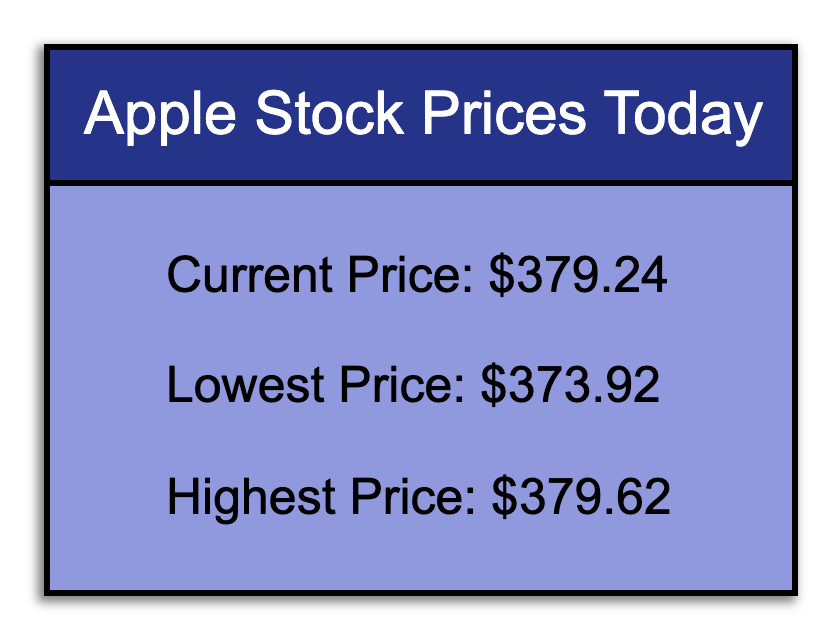
Apple Stock Prices Today
Note:In our code example, we used the endpoint:"https://finnhub.io/api/v1/quote?symbol=AAPL&token=<personal api key>"which contains some information about a"<personal api key>". Oftentimesexternal APIsrequire some special token or API key. These keys can usually be created through the API’s site by signing up for an account. In this case, we signed up through theFinnhubAPI to get information about stock prices. Since API keys should be kept private, we opted to leave"<personal api key>"as a placeholder rather than providing the actual key. If the code snippet was copied and pasted exactly as is, the code wouldn’t work because of this placeholder.
Wrapping Up
Congratulations! Like so many other Wix features that reduce the complexity ofprogrammingconcepts, thewix-fetchmodule allows us to easily retrieve data from other sources and take our websites to the next level while cutting down on development time.
In this article, we covered:
- Why getting information from other sites is so important.
- An overview of thewix-fetchmodule and itsfetch()andgetJSON()functions.
- What JSON is and how it’s used.
- How to make a GET request using thegetJSON()function.
- Handling the response of thegetJSON()function by chaining the.then()and.catch()methods.
Thewix-fetchmodule gives us the freedom to request data from many third-party sources. Imagine the possibilities! Below are some potential applications of thewix-fetchmodule:
- Finnhubprovides real-time information on stocks. In this article, we used Finnhub’s API “Quote” feature to get updated Apple stock prices.
- Open Weather Mapallows us to get real-time weather data.
- NASAsupplies data from various research/missions they are conducting.
Go ahead and apply the techniques that you learned in this article towards building even more powerful Wix sites - the sky’s the limit!
'The Codecademy Team, composed of experienced educators and tech experts, is dedicated to making tech skills accessible to all. We empower learners worldwide with expert-reviewed content that develops and enhances the technical skills needed to advance and succeed in their careers.'
Complete Payment to Unlock Full Guide & Source Code
You are viewing the 30% preview. Join TopCourseAI Pro to unlock the remaining 70% of this article, unblur all code snippets, and gain full access to all 412 technical projects and guides.
Ready to access the complete step-by-step tutorial?
Gain full unhindered access to all 412 technical projects and guides, unblur all source code snippets, and download runnable scripts.
Related Blueprints & Guides
View all 166 →Accessibility on the Platform
Codecademy is committed to providing a high-quality learning experience for all learners. That includes accommodating different usage forms such as auditory, motor, or visual restrictions, limited hardware, or other acce...
Web developmentAffordances, Signifiers, and Clickability
For users on the web, the mouse click is perhaps the most fundamental human-computer interaction. The webbecamethe web partially through the power ofhypertext, or text in one document that links to other documents or res...
Web developmentAuthentication and OAuth
Authenticationis the process used by applications to determine and confirm identities of users. It ensures that the correct content is shown to users. More importantly, it ensures that incorrect content is secured and u...
Ready to build production-grade AI systems?
Enjoyed this guide? Continue exploring our library of 166+ production blueprints, multi-agent swarms, and autonomous agent systems with 100% unblurred, executable source code.