
What is Streamlit? A Complete Guide for Building Data Apps
What is Streamlit? A Complete Guide for Building Data Apps
Have you ever considered writing a few lines of Python and instantly turning them into a live, interactive web app? No JavaScript, no CSS, and no complicated front-end frameworks, just Python.
That's the power of Streamlit, an open-source Python framework built specifically for creating data apps and machine learning dashboards.
With Streamlit, data scientists and developers can go from idea to deployed app in hours instead of weeks. Whether you want to visualize your dataset, share ML predictions, or create dashboards for stakeholders, Streamlit makes it simple, fast, and attractive. We'll build a simple CSV visualizer in this tutorial to test the capability of Streamlit, but before that, let's understand what exactly Streamlit is.
What is Streamlit?
At its core, Streamlit is a Python library that converts scripts into web applications. Unlike general-purpose frameworks like Flask or Django, Streamlit focuses entirely on data-driven apps.
Here's what makes it unique:
- Designed for data scientists rather than traditional web developers.
- Eliminates the need for HTML, CSS, or JavaScript.
- Comes with widgets, real-time reloading, and chart integrations built-in.
Streamlit has grown rapidly in popularity because it lowers the barrier for creating shareable apps. Instead of emailing spreadsheets or static Jupyter notebooks, you can give stakeholders an interactive app they can use in their browser.
How to install Streamlit
Getting started is straightforward. Streamlit is available via pip and works in any standard Python environment.
pip install streamlitOnce installed, we can verify everything is working by running the following command:
streamlit helloThis will launch a demo app in your browser showcasing Streamlit's widgets, charts, and layouts. It's a quick way to see what's possible before writing your own app.
How to run Streamlit code
Unlike normal Python scripts where you run python file.py, Streamlit apps require a special command:
streamlit run app.pyWhen we execute this command, we'll observe:
- Streamlit starts a local server on our machine.
- Our browser opens automatically with the running app.
- Any changes we make to the Python script will trigger a hot reload in the app.
This means we can build our app interactively, watching our changes appear in real time.
Understanding the Streamlit functions
Streamlit provides a set of functions that handle everything from text and layout to widgets and charts**. Think of them as your "toolbox" for building apps.
Text and Titles
import streamlit as st
st.title("Welcome to My Streamlit App")st.header("This is a header")st.subheader("This is a subheader")st.write("Here’s a paragraph of text.")- st.title: Big page title.
- st.header / st.subheader: Section headings.
- st.write: Displays text, numbers, dataframes, or Markdown.
Widgets
Widgets allow users to interact with your app.
name = st.text_input("Enter your name")age = st.slider("Select your age", 1, 100)
if st.button("Submit"): st.write(f"Hello {name}, you are {age} years old!")- st.text_input: Creates a text box.
- st.slider: Creates an adjustable slider.
- st.button: Adds a clickable button.
Data Display
Streamlit shines when working with dataframes and charts like:
import pandas as pd
df = pd.DataFrame({    "Numbers": [1, 2, 3, 4, 5],    "Squares": [1, 4, 9, 16, 25]})
st.dataframe(df)st.line_chart(df)
This automatically creates an interactive table and a line chart.
Layouts
Here's how we can arrange widgets and charts using layouts:
col1, col2 = st.columns(2)
with col1:  st.write("Column 1 content")
with col2:  st.write("Column 2 content")
Layouts help you design dashboards without touching CSS. Now that we have a basic understanding of Streamlit, let's move on to the main task, building something.
Building a Streamlit Application
Now let's build a Streamlit data app step by step.
Step 1: Create a file called app.py:
import streamlit as stimport pandas as pd
st.title("Simple Data Explorer")
# Upload CSVuploaded_file = st.file_uploader("Upload a CSV file", type=["csv"])
if uploaded_file is not None:  df = pd.read_csv(uploaded_file)  st.write("Here’s a preview of your data:")  st.dataframe(df.head())
  # Add a chart  st.line_chart(df.select_dtypes(include=["number"]))
In the above code:
- We imported the necessary libraries for the interface and pandas for data handling.
- Set a title for the page using the st.title() function.
- Add a file uploader widget so users can upload a CSV file.
- Once a file is uploaded, read it into a DataFrame with pandas.
- Display a preview of the first few rows using st.dataframe().
- Create a line chart using only the numeric columns from the dataset with st.line_chart().
In just a few lines of code, raw CSV files can be transformed into an interactive web app for data preview and visualization.
Step 2: Run the app with the following command:
streamlit run app.py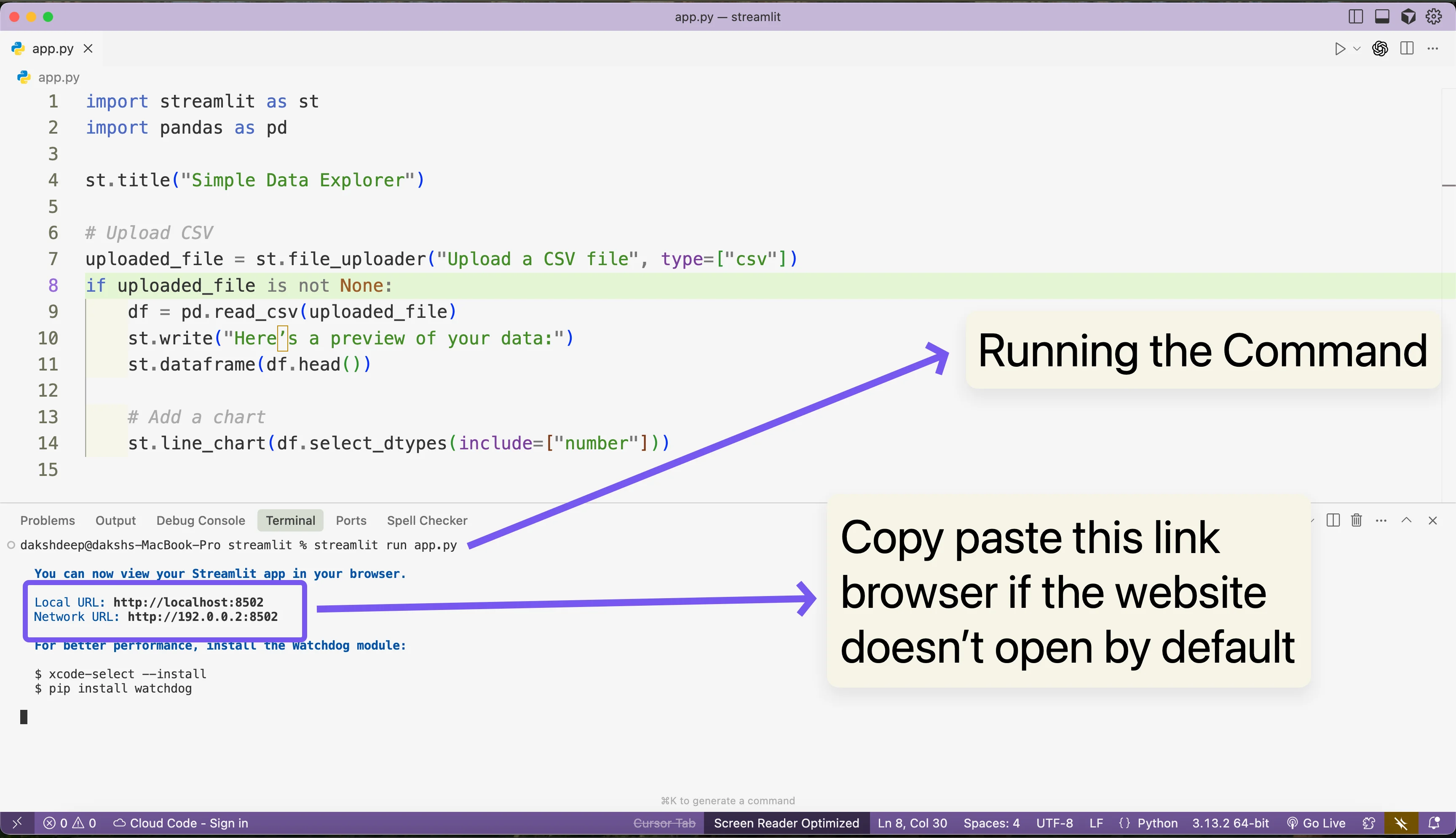
Streamlit code with the command showing how to compile the application
Here's what the application will look like once we run it:
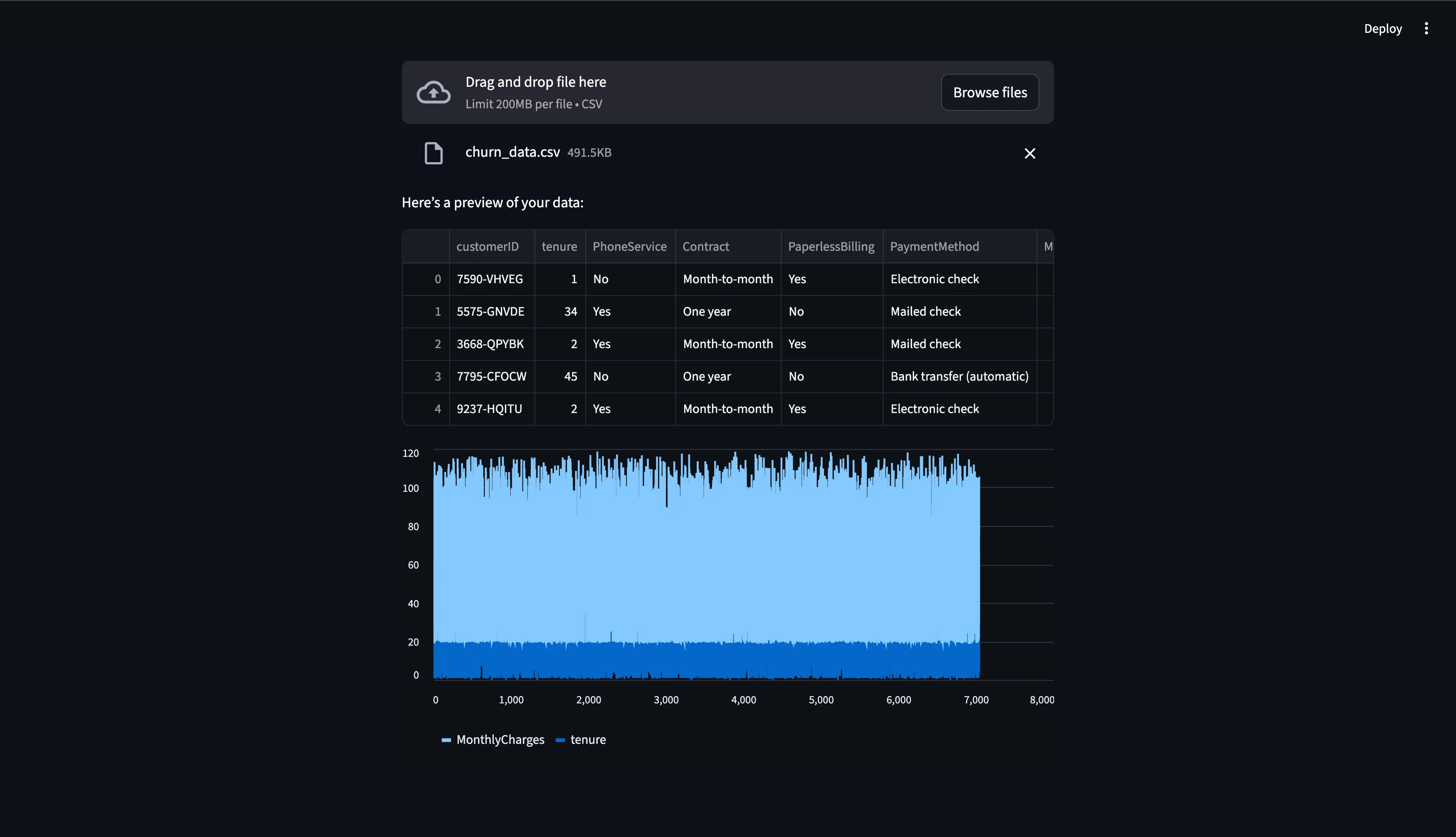
Showing the Streamlit application we built
Now you can upload your own CSV and instantly get a data preview and chart without web development required. With this, we are done running a simple application locally, but what about the deployment part so we can share our coded project with the whole world? So, let's solve this issue next.
Step 3: Deployment is where Streamlit truly shines. We have multiple options here like:
- Streamlit Community Cloud (Recommended for Beginners): Free hosting provided by Streamlit. Push your code to GitHub, connect your repo, and deploy with one click.
- Docker Deployment: Package your app in a Docker container for consistent environments. You can check our Docker tutorials for details.
- Cloud Providers: We can use AWS, GCP, or Azure for enterprise grade deployments.
Here's an example Dockerfile for Streamlit:
FROM python:3.9-slimWORKDIR /appCOPY requirements.txt .RUN pip install -r requirements.txtCOPY . .CMD ["streamlit", "run", "app.py", "--server.port=8501", "--server.address=0.0.0.0"]If you're not familiar with Docker you can check our what is Docker tutorial.
Streamlit vs other frameworks
Understanding how Streamlit compares to alternatives helps you choose the right tool:
Streamlit vs Flask: Flask is a general-purpose web framework requiring HTML/CSS knowledge, while Streamlit focuses exclusively on data apps with Python-only syntax. Streamlit is faster for prototyping but less customizable.
Streamlit vs Django: Django is a full-featured framework for complex web applications with built-in authentication and admin panels. Streamlit is lighter and designed specifically for data visualization and ML dashboards, not full websites.
Streamlit vs Dash: Both target data applications, but Streamlit has a simpler learning curve and faster development time. Dash (built on Flask) offers more customization options for production-grade applications.
When to choose Streamlit: Best for rapid prototyping, internal dashboards, data science portfolios, and ML model demos. For high-scale production apps with complex user authentication, consider Flask or Django.
Key features of Streamlit
- Widgets: Sliders, buttons, text boxes, and checkboxes.
- Real-time interactivity: Hot reloading makes development fast.
- Data-friendly: Pandas, NumPy, Plotly, and Matplotlib integrate seamlessly.
- Custom layouts: Columns, sidebars, expanders, and themes.
- Deployment options: From free hosting to enterprise cloud.
Conclusion
Streamlit is one of the simplest yet most powerful tools in the Python ecosystem. It empowers you to prototype faster, share insights quicker, and create interactive dashboards effortlessly.
Whether you're a data scientist sharing a model, an analyst presenting a dashboard, or a hobbyist building a fun app, Streamlit offers a smooth path from Python script to Web app to Deployed solution.
Your next step? Try building a Streamlit app with your dataset, then deploy it using Streamlit Cloud or Docker to share with the world.
Frequently asked questions
1. Is Streamlit free?
Yes, it's completely free and open source.
2. Can Streamlit be used for production apps?
Yes, but it's best for dashboards, internal tools, and data science applications. For high-scale production apps with complex requirements, frameworks like Flask or Django may be better.
3. How is Streamlit different from Dash?
Streamlit is faster to learn and prototype, while Dash offers more customization.
4. Does Streamlit support machine learning model deployment?
Yes, you can load ML models (e.g., scikit-learn, TensorFlow) and serve predictions directly in your app.
5. Do I need web development knowledge?
Not at all, Streamlit is designed for Python users without front-end skills.
'The Codecademy Team, composed of experienced educators and tech experts, is dedicated to making tech skills accessible to all. We empower learners worldwide with expert-reviewed content that develops and enhances the technical skills needed to advance and succeed in their careers.'
- What is Streamlit?
- How to install Streamlit
- How to run Streamlit code
- Understanding the Streamlit functions
- Building a Streamlit Application
- Streamlit vs other frameworks
- Key features of Streamlit
- Conclusion
- Frequently asked questions
Complete Payment to Unlock Full Guide & Source Code
You are viewing the 30% preview. Join TopCourseAI Pro to unlock the remaining 70% of this article, unblur all code snippets, and gain full access to all 412 technical projects and guides.
Ready to access the complete step-by-step tutorial?
Gain full unhindered access to all 412 technical projects and guides, unblur all source code snippets, and download runnable scripts.
What is Spring Boot?
Next BlueprintWhat is Wireframing in Mobile App Development?
Related Blueprints & Guides
View all 166 →A Complete Guide to Vercel's AI SDK
Vercel AI SDK is a powerful TypeScript-first toolkit that provides a unified interface for building AI applications with Next.js and other modern frameworks. It eliminates the traditional complexity of managing multiple ...
AI Agents & AutomationAG-UI: How the Agent-User Interaction Protocol Works
AG-UI (Agent-User Interaction Protocol) is an open, lightweight protocol that standardizes the way AI agents interact with frontend apps. Consider it a common language that eliminates the need for custom integration code...
Generative AI FoundationsAI vs Generative AI: Understanding the Difference
Artificial Intelligence, or AI, is everywhere, from chatbots helping you shop to recommendation engines suggesting your next binge. Yet not all AI is the same, and the term is often used loosely, leaving many confused be...
Ready to build production-grade AI systems?
Enjoyed this guide? Continue exploring our library of 166+ production blueprints, multi-agent swarms, and autonomous agent systems with 100% unblurred, executable source code.