
AG-UI: How the Agent-User Interaction Protocol Works
AG-UI: How the Agent-User Interaction Protocol Works
What is AG-UI?
AG-UI (Agent-User Interaction Protocol) is an open, lightweight protocol that standardizes the way AI agents interact with frontend apps. Consider it a common language that eliminates the need for custom integration code by enabling any agent backend to communicate with any user interface. AG-UI employs an event-based architecture in which agents stream updates while working, as opposed to imposing the conventional request-response pattern on them. This implies that your interface can show progress in real-time, whether the agent is generating text, calling tools, or updating shared state.
AG-UI works over familiar technologies like HTTP, Server-Sent Events, or WebSockets, making it easy to adopt regardless of your tech stack. AG-UI was born from CopilotKit’s partnership with LangGraph and CrewAI, emerging from real-world needs rather than theoretical design. It complements other protocols in the agent ecosystem - while MCP handles agent-to-tool communication and A2A manages agent-to-agent interaction, AG-UI focuses specifically on the agent-to-user connection. This creates a complete picture where each protocol handles its specialized domain without overlap.
So what happens behind the scenes when an agent uses AG-UI to communicate?
How does AG-UI work?
AG-UI creates a two-way event-driven connection between your frontend and agent backend, enabling real-time interaction without polling or waiting for complete responses. This architecture allows agents to stream progress, pause for approvals, and synchronize state while users see everything unfold instantly. Here’s a breakdown of the interaction cycle:
Establishing the connection
Your application sends a POST request to the agent endpoint with the user’s input, relevant context, and any configuration needed to begin execution.
Opening the event stream
Once the request is received, a persistent connection opens through Server-Sent Events (SSE) or WebSockets. This single channel carries all updates from the agent to your interface.
Event structure
Each event the agent emits includes:
- A standard type identifier (like TEXT_MESSAGE_CONTENT, TOOL_CALL_START, or STATE_DELTA)
- A lightweight payload containing only essential data for that event
Streaming events in real-time
While processing your request, the agent broadcasts events as actions happen. These could be text chunks, tool calls, state changes, or status updates, all delivered immediately as they occur.
Instant UI updates
Your frontend responds to each incoming event by refreshing the display, showing partial results, or prompting for user input, all without waiting for the entire process to complete.
Two-way communication
The frontend can send information back to the agent during execution, including user decisions, interface context, or cancellation requests. This creates interactive feedback loops where humans and agents collaborate actively.
This cycle repeats throughout the agent’s execution, maintaining continuous synchronization between what the agent is doing and what users see.
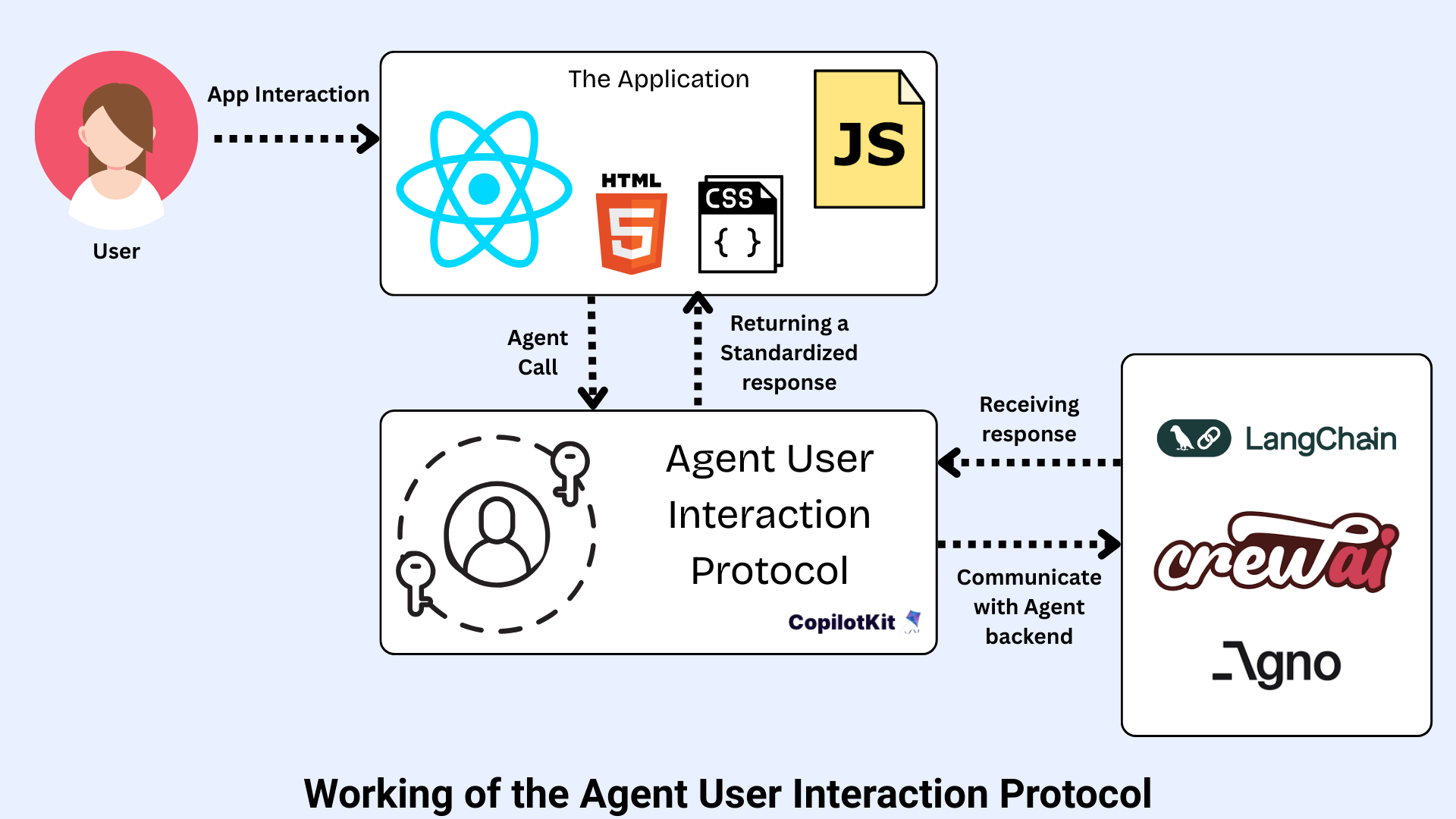
AG-UI Agent-User Interaction Protocol workflow showing connection establishment, event streaming, and two-way communication
Now, let’s explore the details of how this event communication actually works.
Event stream communication
AG-UI transmits a continuous sequence of JSON-formatted events through standard web protocols like HTTP, SSE, or WebSockets. Each event carries a type field that identifies the action taking place and a streamlined payload containing just the necessary information. The agent broadcasts these events the moment they happen, whether it’s generating text tokens, executing functions, or modifying application state. Your interface processes them instantly without repeatedly checking for updates or blocking while waiting for final results, creating a fluid experience where every development appears as it unfolds.
Why event-driven?
Traditional APIs leave users staring at loading indicators while agents complete their work. A task that takes 30 seconds means half a minute of a frozen screen with zero insight into what’s happening behind the scenes. AG-UI changes this by delivering updates every few hundred milliseconds. Rather than waiting and staring at the loading indicator, users watch the agent think, see which tools it’s calling, and observe results building incrementally. This visibility transforms agents from mysterious background processes into active collaborators, making it possible for humans and AI to work together in the same workspace on evolving documents, plans, and outputs.
But why did the developer community need yet another protocol?
Why was AG-UI created?
The AI agent landscape underwent a fundamental shift. Early agents like Devin operated as background workers, handling tasks autonomously without user interaction. Modern agents like Cursor work differently by collaborating with users in real-time, showing their thought process and co-creating in shared workspaces. This evolution exposed a critical gap that existing web protocols weren’t designed for this kind of dynamic, ongoing interaction between humans and AI.
Without standardization, developers faced persistent technical challenges:
- Real-time streaming: LLMs generate text token by token, but users expect to see those tokens appear instantly rather than staring at blank screens waiting for complete responses.
- Tool orchestration: Agents call functions, execute code, and interact with external APIs. Interfaces need to display this activity as it happens and sometimes pause to request human approval before sensitive actions proceed.
- Shared mutable state: When agents generate evolving artifacts like plans, spreadsheets, or code folders, resending entire documents with each tiny change wastes bandwidth. Implementing efficient updates through diffs requires a standardized schema.
- Concurrency and cancellation: Users launch multiple queries, cancel requests mid-execution, and switch between conversation threads. Systems need proper identifiers for threads and runs, plus graceful shutdown handling.
- Framework sprawl: Popular frameworks like LangChain, CrewAI, Mastra, and AG2 each use different communication patterns. Without a common standard, developers write custom integration code for every agent-frontend combination.
Real-time streaming: LLMs generate text token by token, but users expect to see those tokens appear instantly rather than staring at blank screens waiting for complete responses.
Tool orchestration: Agents call functions, execute code, and interact with external APIs. Interfaces need to display this activity as it happens and sometimes pause to request human approval before sensitive actions proceed.
Shared mutable state: When agents generate evolving artifacts like plans, spreadsheets, or code folders, resending entire documents with each tiny change wastes bandwidth. Implementing efficient updates through diffs requires a standardized schema.
Concurrency and cancellation: Users launch multiple queries, cancel requests mid-execution, and switch between conversation threads. Systems need proper identifiers for threads and runs, plus graceful shutdown handling.
Framework sprawl: Popular frameworks like LangChain, CrewAI, Mastra, and AG2 each use different communication patterns. Without a common standard, developers write custom integration code for every agent-frontend combination.
AG-UI emerged from CopilotKit’s practical experience building in-app agent interactions, initially through partnerships with LangGraph and CrewAI. Born from production requirements rather than abstract design, the protocol establishes a consistent contract between agents and interfaces. This eliminates custom WebSocket formats, text parsing hacks, and framework-specific adapters, letting developers focus on building features instead of reinventing communication layers.
AG-UI organizes agent-user interactions into five distinct event categories.
The core event types in AG-UI
AG-UI has around 16 event types organized into five distinct categories, each serving a specific purpose in agent-user communication.
These events provide a complete vocabulary for everything that happens during an agent interaction, from starting a run to streaming text to executing tools. Here are the different categories:
Lifecycle events
Lifecycle events track an agent run from beginning to end, providing clear signals about execution status at every stage. These events form the structural backbone that enables features like loading indicators, progress tracking, and graceful error recovery in your interface. Here are the key lifecycle events:
- RUN_STARTED: Signals the beginning of an agent execution
- STEP_STARTED: Marks the start of an individual step within a run
- STEP_FINISHED: Indicates completion of a specific step
- RUN_FINISHED: Confirms successful completion of the entire run
- RUN_ERROR: Provides failure details and error information when something goes wrong
RUN_STARTED: Signals the beginning of an agent execution
STEP_STARTED: Marks the start of an individual step within a run
STEP_FINISHED: Indicates completion of a specific step
RUN_FINISHED: Confirms successful completion of the entire run
RUN_ERROR: Provides failure details and error information when something goes wrong
Lifecycle events enable frontends to show loading indicators, track progress through multi-step processes, and handle errors gracefully when they occur.
Text message events
Text message events handle the streaming of generated text, delivering content piece by piece as the agent produces it. This creates the familiar “typing” effect you see in chat interfaces, where text appears progressively rather than all at once. Key text message events are:
- TEXT_MESSAGE_START: Begins a new message and signals that text generation is starting
- TEXT_MESSAGE_CONTENT: Delivers the token stream, with each event containing a chunk of text
- TEXT_MESSAGE_END: Completes the message, indicating no further content will be added
TEXT_MESSAGE_START: Begins a new message and signals that text generation is starting
TEXT_MESSAGE_CONTENT: Delivers the token stream, with each event containing a chunk of text
TEXT_MESSAGE_END: Completes the message, indicating no further content will be added
Text message events are responsible for creating responsive chat interfaces where users see text appear in real-time as the agent generates it, providing immediate feedback instead of waiting for complete responses.
Tool call events
Tool call events signal when the agent needs to execute a function or perform an action. These events provide visibility into tool execution and enable human-in-the-loop workflows where users can approve or reject sensitive operations.
- TOOL_CALL_START: Indicates the agent is initiating a tool call
- TOOL_CALL_ARGS: Streams the tool’s arguments as they’re generated, allowing forms to pre-fill before the agent finishes
- TOOL_CALL_END: Marks the completion of the tool call
- TOOL_RESULT: Returns the outcome of the tool execution
TOOL_CALL_START: Indicates the agent is initiating a tool call
TOOL_CALL_ARGS: Streams the tool’s arguments as they’re generated, allowing forms to pre-fill before the agent finishes
TOOL_CALL_END: Marks the completion of the tool call
TOOL_RESULT: Returns the outcome of the tool execution
These events display tool execution progress in real-time, show which functions the agent is calling, and request human approval before performing sensitive actions like database modifications or financial transactions.
State management events
State management events synchronize the agent state with the frontend efficiently, enabling real-time collaboration on evolving content. Instead of resending entire documents with each update, these events use a snapshot-plus-delta pattern to minimize bandwidth and keep interfaces responsive.
- STATE_SNAPSHOT: Sends the complete state, typically used when initially loading or when a full refresh is needed
- STATE_DELTA: Transmits incremental updates as tiny diffs (like “add ‘hello’ at index 5” or “update cell B3”)
STATE_SNAPSHOT: Sends the complete state, typically used when initially loading or when a full refresh is needed
STATE_DELTA: Transmits incremental updates as tiny diffs (like “add ‘hello’ at index 5” or “update cell B3”)
State management events collaborate on evolving artifacts such as documents, spreadsheets, code files, or plans without the overhead of resending entire data structures. Users see changes appear incrementally as the agent generates them, creating a smooth co-editing experience.
Special events provide flexibility for system-specific functionality and edge cases that don’t fit standard categories. These events enable human oversight, protocol extensibility, and integration with external systems.
- INTERRUPT: Pauses agent execution to request human approval, acting as a safety valve for sensitive actions
- CUSTOM: Application-specific events that extend the protocol for unique use cases not covered by standard types
- RAW: Passthrough events from external systems, allowing integration with third-party tools and services
INTERRUPT: Pauses agent execution to request human approval, acting as a safety valve for sensitive actions
CUSTOM: Application-specific events that extend the protocol for unique use cases not covered by standard types
RAW: Passthrough events from external systems, allowing integration with third-party tools and services
Special events implement human-in-the-loop workflows where critical operations require explicit user confirmation before proceeding. They also enable custom functionality specific to your application without breaking protocol compatibility.
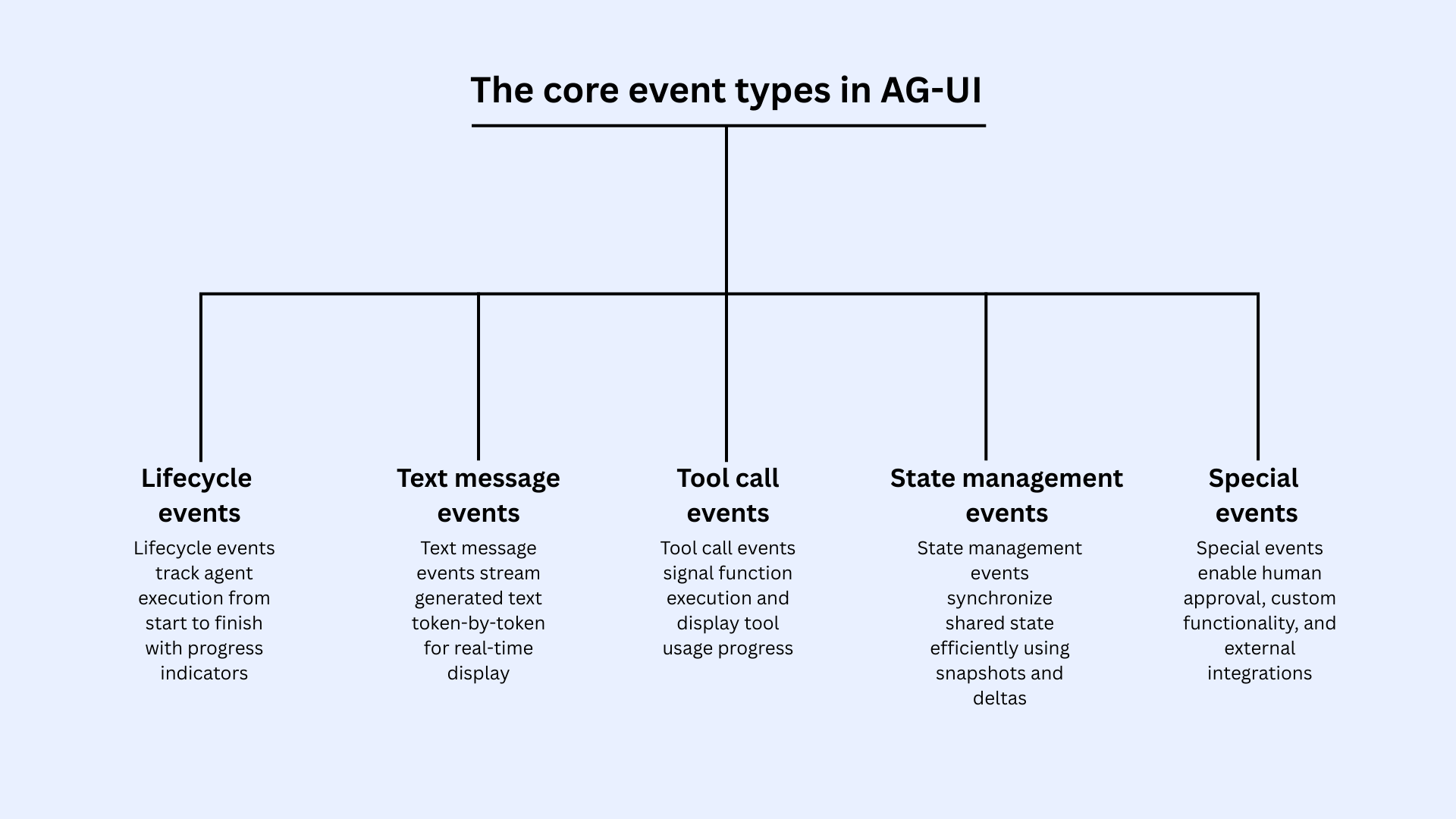
AG-UI Agent-User Interaction Protocol core event types: lifecycle, text message, tool call, state management, and special events
These event types unlock several powerful capabilities for agent applications.
Key features and capabilities of AG-UI
The features of AG-UI work together to create responsive, transparent, and user-friendly experiences that go far beyond simple chatbots. Here are some of the key features:
- Real-time streaming: Users see progress every few hundred milliseconds instead of waiting for complete responses, making even the minor tasks feel responsive
- Tool orchestration with human approval: Interfaces display tool execution progress in real-time and can pause for human approval on sensitive operations while preserving context
- Efficient state synchronization: Uses snapshot plus delta pattern to enable collaboration on evolving artifacts without resending entire documents, minimizing bandwidth
- Multimodality support: Streams images, audio, and file attachments alongside text with standardized handling across all content types
- Thinking steps visibility: Separates internal agent reasoning from public responses, letting you show or hide execution progress based on UX needs
- Generative UI compatibility: Agents can return UI components instead of text and work seamlessly with A2UI for dynamic, declarative interfaces
- Interruptibility & concurrency: Users can pause, override, or guide agent behavior mid-execution while the system handles multiple queries and thread switching without losing context
Real-time streaming: Users see progress every few hundred milliseconds instead of waiting for complete responses, making even the minor tasks feel responsive
Tool orchestration with human approval: Interfaces display tool execution progress in real-time and can pause for human approval on sensitive operations while preserving context
Efficient state synchronization: Uses snapshot plus delta pattern to enable collaboration on evolving artifacts without resending entire documents, minimizing bandwidth
Multimodality support: Streams images, audio, and file attachments alongside text with standardized handling across all content types
Thinking steps visibility: Separates internal agent reasoning from public responses, letting you show or hide execution progress based on UX needs
Generative UI compatibility: Agents can return UI components instead of text and work seamlessly with A2UI for dynamic, declarative interfaces
Interruptibility & concurrency: Users can pause, override, or guide agent behavior mid-execution while the system handles multiple queries and thread switching without losing context
AG-UI protocol works across multiple frameworks and powers diverse applications.
AG-UI framework integration and use cases
AG-UI works with popular agent frameworks and frontend tools across the ecosystem. This flexibility helps choose the best tools for our needs without getting locked into a single vendor or technology stack.
Supported frameworks
AG-UI integrates seamlessly with leading frameworks across both backend and frontend, providing broad compatibility that makes adoption straightforward regardless of your existing technology choices.
Backend agent frameworks
AG-UI works with major agent development platforms including:
- LangGraph for building stateful multi-agent workflows
- CrewAI for role-based agent collaboration
- Mastra for agent orchestration
- Pydantic AI for type-safe agent development
- Microsoft Agent Framework for enterprise agent applications.
LangGraph for building stateful multi-agent workflows
CrewAI for role-based agent collaboration
Mastra for agent orchestration
Pydantic AI for type-safe agent development
Microsoft Agent Framework for enterprise agent applications.
This backend flexibility means we can switch between frameworks or use multiple ones simultaneously without rewriting frontend integration code.
On the frontend, AG-UI supports multiple frameworks and languages to fit an application’s needs. React developers can use CopilotKit’s comprehensive components, while Vue and Angular applications have dedicated SDK support. The protocol also provides TypeScript and Python SDKs for building custom integrations or working with non-web interfaces like CLI tools or desktop applications.
Real-world use cases
AG-UI powers diverse applications where agents need dynamic user interaction, demonstrating how real-time capabilities translate into practical value across different domains.
- Collaborative coding tools: Platforms like Cursor IDE enable agents that work alongside developers in real-time. Developers see code generation happen line by line, can interrupt to provide guidance, and collaborate on shared files while the agent explains its reasoning.
- In-app AI copilots: Applications like Notion AI embed agents directly into their interfaces. These copilots update documents, generate content, and modify components while users continue working, making AI feel like a natural part of the application.
- Data dashboards: Business intelligence tools stream insights and update visualizations as agents analyze data. Users watch charts populate and see trend analysis develop in real-time, understanding both results and reasoning.
- CRM systems: Customer relationship platforms use AG-UI for agent-powered form autofill from natural language. Sales teams describe tasks in plain language and watch agents populate fields, select dates, and assign work while displaying each step.
- Multi-agent Workflows: Complex processes orchestrate specialized agents with human oversight. Content workflows might coordinate research, writing, and review agents, with humans approving stage transitions and providing guidance when needed.
Collaborative coding tools: Platforms like Cursor IDE enable agents that work alongside developers in real-time. Developers see code generation happen line by line, can interrupt to provide guidance, and collaborate on shared files while the agent explains its reasoning.
In-app AI copilots: Applications like Notion AI embed agents directly into their interfaces. These copilots update documents, generate content, and modify components while users continue working, making AI feel like a natural part of the application.
Data dashboards: Business intelligence tools stream insights and update visualizations as agents analyze data. Users watch charts populate and see trend analysis develop in real-time, understanding both results and reasoning.
CRM systems: Customer relationship platforms use AG-UI for agent-powered form autofill from natural language. Sales teams describe tasks in plain language and watch agents populate fields, select dates, and assign work while displaying each step.
Multi-agent Workflows: Complex processes orchestrate specialized agents with human oversight. Content workflows might coordinate research, writing, and review agents, with humans approving stage transitions and providing guidance when needed.
The protocol’s growing adoption across major frameworks signals a future where agent-user interactions are as standardized and reliable as REST APIs are today.
Conclusion
AG-UI standardizes agent-user interaction through an event-based protocol with approximately 16 event types covering text streaming, tool orchestration, and state synchronization. With support for major frameworks like LangGraph, CrewAI, and Microsoft Agent Framework, plus frontend integrations for React, Vue, and Angular, AG-UI eliminates custom integration code and vendor lock-in. Production adoption by companies like Microsoft and Oracle shows AG-UI is becoming the foundation for next-generation AI applications.
Explore Codecademy’s Intro to AI Agents course to understand agentic workflows and autonomous systems that power protocols like AG-UI.
Frequently asked questions
1. What kind of events does AG-UI support?
AG-UI supports around 16 event types across five categories: Lifecycle (starting/finishing runs), Text Messages (streaming text), Tool Calls (executing functions), State Management (syncing data), and Special events (pausing for approval or custom needs).
2. How does AG-UI fit with other AI agent protocols?
AG-UI handles agent-to-user communication, MCP connects agents to tools, and A2A manages agent-to-agent communication. Each protocol specializes in one connection type, working together to create complete agent systems.
3. What is the difference between MCP UI and AG-UI?
MCP UI provides interfaces for specific tools that agents use. AG-UI manages the entire communication flow between agents and applications, including text streaming, tool execution, and user interactions throughout the experience.
4. What is AG-UI used for?
AG-UI powers collaborative coding tools, in-app AI assistants, real-time dashboards, automated form filling in business apps, and workflows where agents need human approval before taking actions.
5. What is the difference between A2UI and AG-UI?
A2UI defines how agents create visual components. AG-UI manages how agents and applications communicate in real-time. They work together, AG-UI uses A2UI when agents need to display custom interfaces.
'The Codecademy Team, composed of experienced educators and tech experts, is dedicated to making tech skills accessible to all. We empower learners worldwide with expert-reviewed content that develops and enhances the technical skills needed to advance and succeed in their careers.'
- What is AG-UI?
- How does AG-UI work?
- Why was AG-UI created?
- The core event types in AG-UI
- Key features and capabilities of AG-UI
- AG-UI framework integration and use cases
- Conclusion
- Frequently asked questions
Complete Payment to Unlock Full Guide & Source Code
You are viewing the 30% preview. Join TopCourseAI Pro to unlock the remaining 70% of this article, unblur all code snippets, and gain full access to all 412 technical projects and guides.
Ready to access the complete step-by-step tutorial?
Gain full unhindered access to all 412 technical projects and guides, unblur all source code snippets, and download runnable scripts.
A Complete Guide to Vercel's AI SDK
Next BlueprintAI vs Generative AI: Understanding the Difference
Related Blueprints & Guides
View all 166 →A Complete Guide to Vercel's AI SDK
Vercel AI SDK is a powerful TypeScript-first toolkit that provides a unified interface for building AI applications with Next.js and other modern frameworks. It eliminates the traditional complexity of managing multiple ...
Generative AI FoundationsAI vs Generative AI: Understanding the Difference
Artificial Intelligence, or AI, is everywhere, from chatbots helping you shop to recommendation engines suggesting your next binge. Yet not all AI is the same, and the term is often used loosely, leaving many confused be...
AI Agents & AutomationAgentic AI vs Generative AI: Key Differences
AI used to just recognize things and answer basic questions. Now we have two completely different types that work in their own ways. Understanding what is agentic AI vs generative AI matters because we need to pick the r...
Ready to build production-grade AI systems?
Enjoyed this guide? Continue exploring our library of 166+ production blueprints, multi-agent swarms, and autonomous agent systems with 100% unblurred, executable source code.