
Sublime Text
Sublime Text
Background:
Text editors are programs developers write their code in. Though you might not have a text editor downloaded on your own computer, you’ve more or less used one. On Codecademy, we have a mock-text editor on most screens. It’s the area you write your code in – usually on the right side of the screen or in the top, center section.
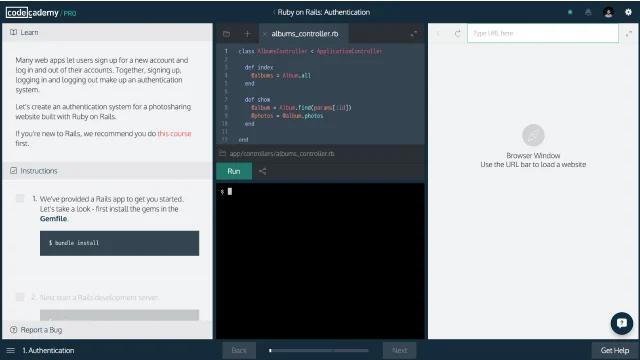
Text_Editor_Setup
While it’s possible to write code anywhere, the code-specific text editors – like the code editor you’ve used on Codecademy – do a couple really helpful things. These include:
- Highlighting syntax according to the language being written
- Indenting code automatically
This quick article walks you through the steps required to set-up Sublime Text, a hugely popular text editor (and a favorite of developers on the Codecademy Team). If you fall in love with Sublime Text (as millions of others have) don’t forget to buy it!
Quick Guide to Using Sublime Text (Mac)
Download
- On the Sublime Textdownload page, click on link for OS X (OS X 10.7 or later is required).
- After it downloads, open the application either from your browser’s download section or from Finder.
- Move Sublime Text into your applications folder.
- Click on the “S” icon to get started on your first code file.
Writing CodeExplore the Sublime Text navigation pane at the top of the screen. You’ll find the basics there, like File > New, File > Save, File > Open, etc., which you’ll need to get started.
Open a new file. When you save it, assign to it the file extension of anyprogramminglanguage you’re familiar with. For instance, forJavaScript, save your file with a.jsfile extension. This will enable syntax-specific code highlighting and auto-indentation, like what you’re used to on Codecademy.
Quick Guide to Using Sublime Text (Windows)
- On the Sublime Textdownload page, click on the link for Windows.
- After it downloads, open the application either from your browser’s download section or from your computer’s Downloads folder.
- You may get a security alert asking if it’s okay to run this software. Yes, it’s okay. Click “Run.”
- Follow the prompts in the Sublime Text Setup Wizard to install the software.
- Find Sublime Text in your file system and open it.
See step 2 in Quick Guide to Using Sublime Text (Mac) above. It’s the same as Windows from this point.
Continued Reading
If you’re coding frequently, it’s well worth it to learn more of the ins-and-outs of your text editor. Check out this morein-depth guideto using some of the special features within Sublime Text. Keyboard shortcuts in particular are worth learning if you’re using Sublime often.
'The Codecademy Team, composed of experienced educators and tech experts, is dedicated to making tech skills accessible to all. We empower learners worldwide with expert-reviewed content that develops and enhances the technical skills needed to advance and succeed in their careers.'
Complete Payment to Unlock Full Guide & Source Code
You are viewing the 30% preview. Join TopCourseAI Pro to unlock the remaining 70% of this article, unblur all code snippets, and gain full access to all 412 technical projects and guides.
Ready to access the complete step-by-step tutorial?
Gain full unhindered access to all 412 technical projects and guides, unblur all source code snippets, and download runnable scripts.
Related Blueprints & Guides
View all 166 →Android Studio Quick-Start Guide
Android Studio often intimidates beginners, but by learning a few handy shortcuts and getting the lay of the land, we can navigate this powerful development environment with ease.
Developer toolsApache Kafka Tutorial: A Complete Guide for Beginners
Apache Kafkais a well-known distributed event streaming platform designed to efficiently manage real-time data feeds. It was originally developed by LinkedIn in 2011 and later open-sourced. Apache Kafka has gained immens...
Developer toolsBuilding Websites with Wix
Creating a website has never been easier. Previously, making a presentable website meant learning HTML, CSS, andJavaScript. The whole process could take weeks, months, or even years before creating a website that you’re...
Ready to build production-grade AI systems?
Enjoyed this guide? Continue exploring our library of 166+ production blueprints, multi-agent swarms, and autonomous agent systems with 100% unblurred, executable source code.