
Setting Up a Backend
Setting Up a Backend
What is a Backend?
In contrast with a website’s frontend, where visitors see and interact with the page, thebackendis the part of the website that visitors have no direct interaction with. The backend is where data, like account information, progress in a video game, or items in a shopping cart, are stored in a database. It’s also where code listens for requests from the frontend, and sends back responses when necessary. This code is often referred to asserver-side code, and is necessary to have a deeper engagement with users.
You may already be aware of the way Wix has simplified data storage withdatabase collections. Wix also has a unique way of allowing users to write server-side code straight from the editor. This is done by creating backend files calledweb modules. Web modules are files where we can write server-side code like functions and there are even ways ofsetting permissionsfor who can call these functions. This setup makes it easy to use the backend code in the frontend!
Setting up a Backend
Creating a web module in the backend is done by turning on Dev Mode, and clickingAdd a new Web Modulefrom thesite structure sidebar.
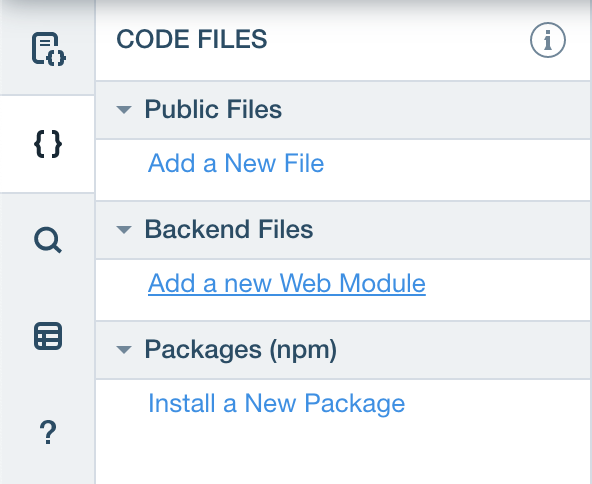
Wix Site Structure Sidebar
A file namedaModule.jswwill be created. The.jswextension is exclusive to Wix, and you can think of it as a standardJavaScriptfile for writing backend code. The new web module contains some example code to work with, a simple function that multiplies two numbers.
export function multiply(factor1, factor2) {  return factor1 * factor2;}
Copy to clipboard
export function multiply(factor1, factor2) { return factor1 * factor2;}Theexportsyntax may be familiar if you’ve used standard JavaScript modules in the past. By usingexportyou allow the function to be called in your frontend code. But unlike standard JavaScript modules, web modules can only export functions that return promises.
Putting It All Together
To call the function from the frontend, animportstatement is needed.importallows themultiply()function from theaModule.jswfile to be called.
import { multiply } from 'backend/aModule';
Copy to clipboard
import { multiply } from 'backend/aModule';With the function imported, now themultiply()can be called from the frontend!
$w.onReady(function () {  multiply(4,5)    .then(product => {      $w('#text1').text = product.toString();		    })    .catch(error => {      console.log(error);    });});
Copy to clipboard
$w.onReady(function () { multiply(4,5) .then(product => { $w('#text1').text = product.toString(); }) .catch(error => { console.log(error); });});Let’s break down the code:
- .onReady()sets the function that runs when all the page elements have finished loading.
- Themultiply()function takes 2 arguments,4and5.
- It then multiplies the arguments together, and returns a promise,product, if successful, or logs an error to the console if unsuccessful.
- The$w('#text1')element is then set to display the value ofproduct.
- Since$w('#text1')needs to be astring,.toString()is used to change it from anumberto astring.
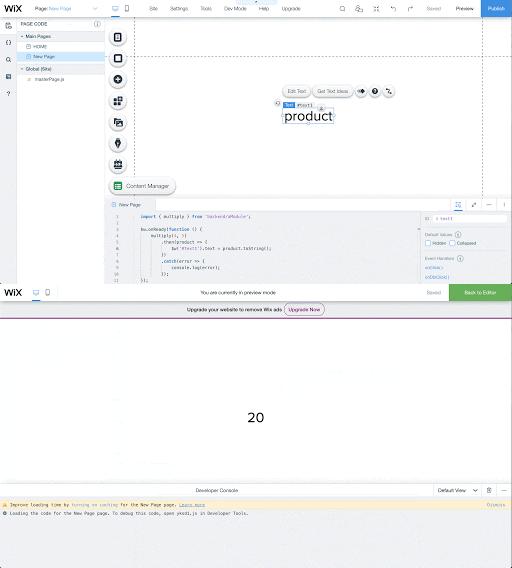
Wix backend calling the multiply function
After callingmultiply()in the frontend, you can see the#text1element changes to a 20 when previewing the site.
While our currentmultiply()function is pretty simple, we can use the backend to handle more complex tasks. Imagine using a function that has sensitive user account information, that you don’t want exposed, or how about a website with thousands of functions in one file! Storing functions in the backend will hide the sensitive information, and enable you to keep your code clean and easy to manage.
Advanced Features
Wix’s web modules make working with the backend easy for beginners, but powerful enough for users with more experience. You can:
- Install approvednpmpackages to gain access to popular libraries of useful JavaScript code.
- Make requests to third partyAPI’swithout exposing yourAPI key. You’ll learn more about this in an upcoming material.
- Adhere toseparation of concernsprinciples. In short, maintaining and troubleshooting code is easier when it’s organized.
Recap
Congratulations, you now know how to set up a backend! You’ve learned how to create a.jswfile, export a function, import it into the code editor, and use it in your frontend code. Create some more web modules to put your new knowledge of the Wix backend to work!
'The Codecademy Team, composed of experienced educators and tech experts, is dedicated to making tech skills accessible to all. We empower learners worldwide with expert-reviewed content that develops and enhances the technical skills needed to advance and succeed in their careers.'
Complete Payment to Unlock Full Guide & Source Code
You are viewing the 30% preview. Join TopCourseAI Pro to unlock the remaining 70% of this article, unblur all code snippets, and gain full access to all 412 technical projects and guides.
Ready to access the complete step-by-step tutorial?
Gain full unhindered access to all 412 technical projects and guides, unblur all source code snippets, and download runnable scripts.
Related Blueprints & Guides
View all 166 →Accessibility on the Platform
Codecademy is committed to providing a high-quality learning experience for all learners. That includes accommodating different usage forms such as auditory, motor, or visual restrictions, limited hardware, or other acce...
Web developmentAffordances, Signifiers, and Clickability
For users on the web, the mouse click is perhaps the most fundamental human-computer interaction. The webbecamethe web partially through the power ofhypertext, or text in one document that links to other documents or res...
Web developmentAuthentication and OAuth
Authenticationis the process used by applications to determine and confirm identities of users. It ensures that the correct content is shown to users. More importantly, it ensures that incorrect content is secured and u...
Ready to build production-grade AI systems?
Enjoyed this guide? Continue exploring our library of 166+ production blueprints, multi-agent swarms, and autonomous agent systems with 100% unblurred, executable source code.