
Introduction to Load Balancing
Introduction to Load Balancing
What is a Load Balancer?
When dealing with the scalability of our software systems, we may often come across the challenge of dealing with an influx of requests. For example, imagine running a popularweb appthat sells dog apparel. We just released a new product (a fashionable dog sweater) and have noticed a significant increase of requests hitting our single server. Users really want to purchase our new dog sweater for their pups! Right now, our web app architecture looks something like this:
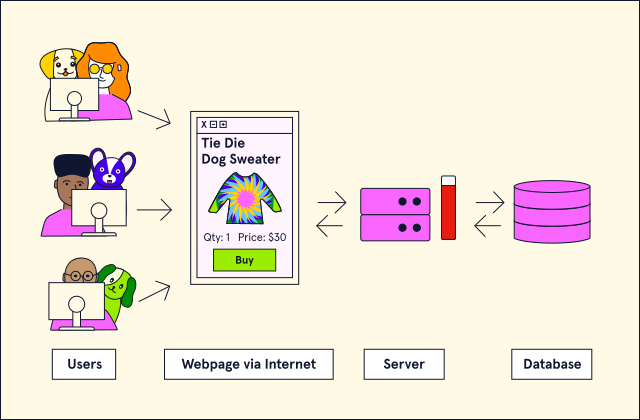
A representation of a basic web app architecture, consisting of Users, a Webpage, a Server, and a Database. Users are able to interact with the Webpage via the Internet. Based on the User's activity, the Webpage will send requests to the Server for processing. Depending on the request, the Server will either respond directly to the Webpage or query the Database to fetch additional information or complete a transaction. Once the Database has fully processed all queries, the Server will perform any remaining calculations before finally responding to the Webpage. In this graphic, there is a vertical bar next to the Server that is nearly full and colored red, indicating that the Server is struggling to keep up with the volume of requests being submitted.
In this architecture, our single server is becoming a bottleneck and is putting our application at risk of performing suboptimally. In order to alleviate the load on our single server, we decide to scale our web app horizontally and purchase a few additional servers. Each server will host a replica of our app now we will be able to distribute request load more effectively. However, with multiple servers, we have the following issue:
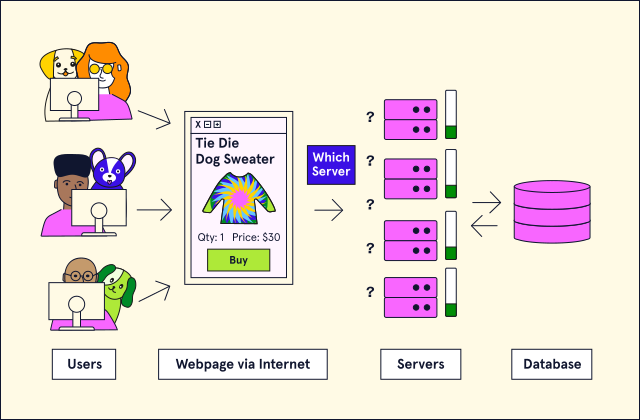
A representation of a basic web app architecture, consisting of Users, a Webpage, multiple Servers, and a Database. This graphic is mostly similar to the previous graphic, except that there are four Servers instead of one. Between the Webpage and the Servers, there is a box labeled "Which Server" accompanied by several question marks. When scaling an app horizontally, it is necessary to tell the app to which server it should send each request. Continue on to learn how this is done.
We need a way to direct the traffic! Our app won’t know where to send the requests unless we provide guidance on which server to send the request to. This is where aload balancercomes into play.
A load balancer is a piece of hardware or software (and sometimes both) that helps distribute requests between different system resources. Load balancers are not just an essential aspect when scaling a system horizontally; they also help prevent specific system resources from getting overloaded and possibly going offline. In addition, load balancers are flexible enough to be placed in various places in a software systems architecture. In our web app example, since we are primarily trying to distribute the load between our servers, here is what our new web app architecture will look like with a load balancer:
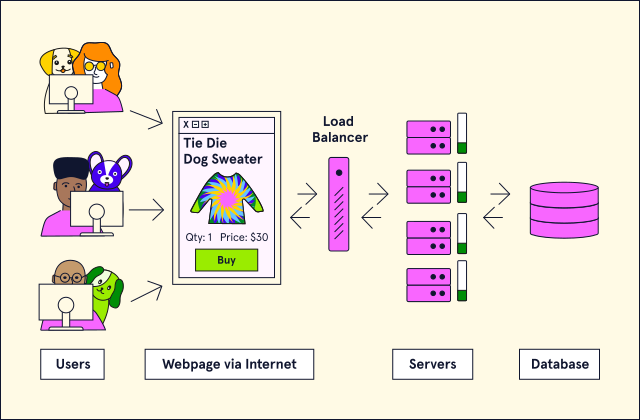
A representation of a basic web app architecture, consisting of Users, a Webpage, a Load Balancer, multiple Servers, and a Database. This graphic is mostly similar to the previous graphic, except that the box labeled "Which Server" has been replaced with a Load Balancer, which is capable of communicating with both the Webpage and the Servers. When a new request is produced from the Webpage, it is now routed through the Load Balancer first. The Load Balancer uses an algorithm to determine which Server should receive the request. This prevents any single Server from having to handle all the requests produced by the application.
When we examine the above image, the way requests route to individual servers for our web app may seem a bit like magic. How exactly is the load balancer deciding which server is best fit to handle the incoming request? How does the load balancer make sure one server doesn’t end up taking all the requests by accident? These questions are all decided based on theload balancing algorithmthat the load balancer uses. Let’s explore what these algorithms are and how they work!
Before we move on, try this question:
Load Balancing Algorithms
A load-balancing algorithm is the programmatic logic that a load balancer uses to decide how to distribute requests between a software system’s resources. While not an exhaustive list, we will take a look at the following five algorithms:
- Least Connection
- Least Response Time
- Least Bandwidth
- Round Robin
- Weighted Round Robin
Least Connection
The least connection (LC) load-balancing algorithm is where requests are distributed to the server with the least number of active connections at the time the request is received. This algorithm assumes all requests generate approximately an equal amount of load.
Least Response Time
The least response time (LRT) load balancing algorithm is a more sophisticated version of the least connection algorithm. This algorithm provides two balancing layers by checking both the resource with the least number of active connections and the least average response time.
Least Bandwidth
The least bandwidth (LB) load-balancing algorithm is where requests are distributed to the server serving the least amount of traffic (usually measured in Mbps).
Round Robin
The round-robin (RR) load-balancing algorithm is considered a circular algorithm because requests are distributed to servers one at a time. Once the last server is reached, the algorithm tells the load balancer to start at the first server it sent a request to and continue the process again.
Weighted Round Robin
The weighted round-robin (WRR) load balancing algorithm is a more advanced version of the round-robin algorithm. This algorithm allows us to assign weights to specific servers and sends requests to the servers with the higher weights.
'The Codecademy Team, composed of experienced educators and tech experts, is dedicated to making tech skills accessible to all. We empower learners worldwide with expert-reviewed content that develops and enhances the technical skills needed to advance and succeed in their careers.'
Complete Payment to Unlock Full Guide & Source Code
You are viewing the 30% preview. Join TopCourseAI Pro to unlock the remaining 70% of this article, unblur all code snippets, and gain full access to all 412 technical projects and guides.
Ready to access the complete step-by-step tutorial?
Gain full unhindered access to all 412 technical projects and guides, unblur all source code snippets, and download runnable scripts.
Related Project Guides
View all 412 →Accessibility on the Platform
Codecademy is committed to providing a high-quality learning experience for all learners. That includes accommodating different usage forms such as auditory, motor, or visual restrictions, limited hardware, or other acce...
Web developmentAffordances, Signifiers, and Clickability
For users on the web, the mouse click is perhaps the most fundamental human-computer interaction. The webbecamethe web partially through the power ofhypertext, or text in one document that links to other documents or res...
Web developmentAuthentication and OAuth
Authenticationis the process used by applications to determine and confirm identities of users. It ensures that the correct content is shown to users. More importantly, it ensures that incorrect content is secured and u...
Ready to start building your next project?
Enjoyed this guide? Continue exploring our library of 412+ step-by-step guides, starter files, and practical projects across Web Development, Mobile Apps, AI, and Design.