
HTML Class vs ID: What’s the Difference and When to Use Each
HTML Class vs ID: What’s the Difference and When to Use Each
What is theidattribute in HTML?
Theidattributein HTML assigns a unique identifier to a single HTML element. This identifier can be used to style the element withCSS, interact with it viaJavaScript, or create internal links within a webpage. Sinceidvalues must be unique, they ensure that only one element on the page will be affected by the styles or scripts that reference it. Here’s the syntax for using theidattribute in HTML:
<element id="unique-id">Content</element>Here,
- element: Any valid HTML tag such as<div>,<p>,<h1>, etc.
- id: A user-defined unique identifier for that element.
Note:No two elements on the same page should have the sameid.
The syntax for referring to theidattribute of an element in CSS is:
#unique-id {
  property: value;
}- The#symbol references theidin CSS.
The syntax of accessing thisidin JavaScript is:
document.getElementById("unique-id").property = "value";- getElementByIdaccesses the element with the specifiedid.
Example:
<!DOCTYPE html>  <html lang="en">
<head>    <title>HTML ID Attribute Example</title>    <style>      /* CSS for styling the element with a specific ID */      #intro {        color: blue;        font-size: 20px;        font-family: Arial, sans-serif;      }    </style>  </head>
<body>    <header>      <h1>Welcome to My Website</h1>    </header>    <main>      <section>        <p id="intro">This is an introductory paragraph that has a unique ID.</p>        <p>This paragraph does not have a unique ID.</p>      </section>    </main>
  <footer>      <p>Contact us at: contact@example.com</p>    </footer>
  <script>      // JavaScript to change the content of the element with id="intro"      document.getElementById("intro").innerText = "This paragraph has been updated using JavaScript!";    </script>  </body>  </html>
Copy to clipboard
<!DOCTYPE html> <html lang="en">
<head> <title>HTML ID Attribute Example</title> <style> /* CSS for styling the element with a specific ID */ #intro { color: blue; font-size: 20px; font-family: Arial, sans-serif; } </style> </head>
<body> <header> <h1>Welcome to My Website</h1> </header> <main> <section> <p id="intro">This is an introductory paragraph that has a unique ID.</p> <p>This paragraph does not have a unique ID.</p> </section> </main>
<footer> <p>Contact us at: contact@example.com</p> </footer>
<script> // JavaScript to change the content of the element with id="intro" document.getElementById("intro").innerText = "This paragraph has been updated using JavaScript!"; </script> </body> </html>In this example:
- The paragraph with theid="intro"is styled with CSS to display in blue color, with a font size of 20px.
- The JavaScript script modifies the paragraph’s text content by selecting the element via itsidand changing the text to “This paragraph has been updated using JavaScript!”
The output generated by this code will look like:
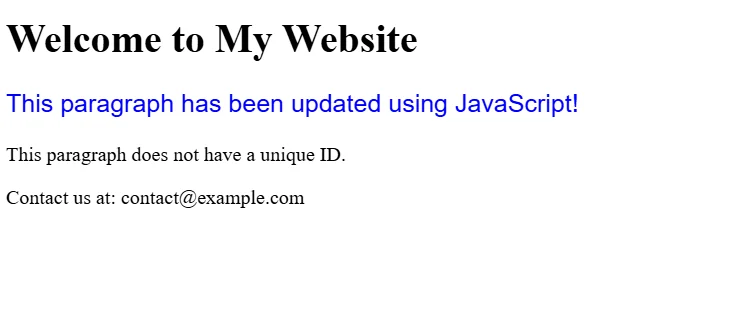
Output generated by using the id attribute of HTML
As we can see, theidparameter ensures that only one element with this identifier is affected, making it ideal for unique selections and actions.
Now that we know how theidattribute works, let us understand theclassattribute of HTML.
What is the HTMLclassAttribute?
Theclassattribute in HTML assigns an element one or more class names. In contrast to theidattribute, which is restricted to one element per page, the same class name can be assigned to multiple elements. This allows us to style, select, or manipulate groups of elements collectively, making it ideal for applying the same style or functionality to multiple elements on a page. The syntax of using theclassattribute in HTML is:
<element class="class-name">Content</element>Here:
- element: Any valid HTML tag such as<div>,<p>,<h1>, etc.
- class: One or more class names for that element. Multiple class names may be assigned to a single element by separating them with spaces.
To refer to theclassattribute of an element in CSS, the following syntax is used:
.class-name {
  property: value;
}- The.symbol is used in CSS to reference the class of an element.
To access the elements using theclassattribute in JavaScript, use the following syntax:
document.getElementsByClassName("class-name")[0].property = "value";- getElementsByClassNameretrieves all elements that share the specified class name. This returns a collection so that you can access individual elements by their index.
<!DOCTYPE html>  <html lang="en">
<head>  <title>HTML Class Attribute Example</title>    <style>      /* CSS for styling elements with a specific class */      .highlight {        color: red;        font-size: 18px;        font-family: 'Arial', sans-serif;      }   </style>  </head>
<body>    <header>      <h1>HTML Class Example</h1>    </header>
  <main>      <section>        <p class="highlight">This paragraph has a class that makes its text red.</p>        <p class="highlight">This is another paragraph with the same class, so it has the same styling.</p>        <p>This paragraph does not have a class.</p>      </section>    </main>
  <footer>      <p>Contact us at: contact@example.com</p>    </footer>
  <script>      // JavaScript to change the content of all elements with the "highlight" class      var elements = document.getElementsByClassName("highlight");      for (var i = 0; i < elements.length; i++) {        elements[i].innerText = "This text has been updated!";      }    </script>  </body>  </html>
Copy to clipboard
<!DOCTYPE html> <html lang="en">
<head> <title>HTML Class Attribute Example</title> <style> /* CSS for styling elements with a specific class */ .highlight { color: red; font-size: 18px; font-family: 'Arial', sans-serif; } </style> </head>
<body> <header> <h1>HTML Class Example</h1> </header>
<main> <section> <p class="highlight">This paragraph has a class that makes its text red.</p> <p class="highlight">This is another paragraph with the same class, so it has the same styling.</p> <p>This paragraph does not have a class.</p> </section> </main>
<footer> <p>Contact us at: contact@example.com</p> </footer>
<script> // JavaScript to change the content of all elements with the "highlight" class var elements = document.getElementsByClassName("highlight"); for (var i = 0; i < elements.length; i++) { elements[i].innerText = "This text has been updated!"; } </script> </body> </html>In this example:
- The first two paragraphs have theclass="highlight"which applies the red color and font style.
- The JavaScript code targets all elements with thehighlightclass and modifies their text content.
The output generated by the code will be:
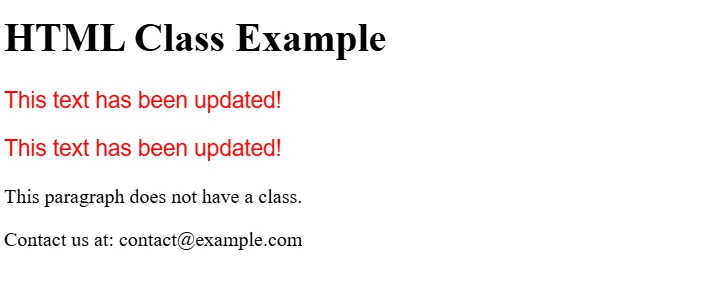
Output generated by using the class attribute of HTML
Theclassattribute allows us to group elements and apply common styles or JavaScript functionality. Unlike theidattribute, it provides flexibility in styling multiple elements without requiring them to be unique.
Now that we’ve explored theidandclassattributes individually, let’s compare them to highlight their key differences.
Difference between theidandclassattributes of HTML
The following table summarizes the core differences between theidandclassattributes, making it easier to choose the right one for a specific use case:
When should you useidorclassin HTML?
Understanding the difference is essential, but knowing when to use id and class in real-world scenarios is what makes you a better developer. Here’s a guide to help you decide:
Useidwhen
- You need to target one specific element on the page (like a header, a special button, or a form).
- You’re linking to a particular part of the page using an anchor (e.g.,href="#section1").
- You want to apply JavaScript to a single element (e.g., a modal popup or toggle).
- You’re applying unique styling that shouldn’t be repeated on other elements.
Useclasswhen
- You have multiple elements that should share the same style (like buttons, cards, or text blocks).
- You’re applying the same JavaScript behavior to several elements (e.g., toggling visibility, animations).
- You want to keep your code clean and reusable by grouping elements logically.
Note:You can combineidandclasson the same element if needed, just make sure the id stays unique. Here’s an example:
<p id="featured-para" class="intro-text">Welcome to our website!</p>
Copy to clipboard
<p id="featured-para" class="intro-text">Welcome to our website!</p>Conclusion
In this article, we examined the difference between the id and class attributes in HTML, covering their syntax, use cases, and how to decide which to use when. Understanding these foundational elements is key to writing clean, maintainable, and scalable code.
To continue building your HTML skills and dive deeper into hands-on practice, explore Codecademy’sLearn HTMLcourse. It’s a great next step if you’re looking to strengthen your web development foundation.
Frequently asked questions
1. What is the best way to learn HTML?
The most effective way to learn HTML is through practical exercises and structured tutorials. Start with the basics of elements, tags, and attributes, then gradually build simple web pages. Online interactive platforms likeCodecademy’s Learn HTMLoffer structured lessons and real-time feedback that make learning effective and engaging.
2. Isclassstronger thanid?
No, in terms of CSS specificity,idis stronger thanclass. This means that when bothidandclassstyles are applied to the same element, theidstyles will take precedence over those from theclassselector, unless other factors like!importantare involved.
3. How do you target an element byidin HTML?
To target an element byidin CSS, use the#symbol:
#my-id {  color: red;  }
Copy to clipboard
#my-id { color: red; }In JavaScript, you can access it like this:
document.getElementById("my-id");
Copy to clipboarddocument.getElementById("my-id");4. Can we give elements twoids in HTML?
No, an HTML element cannot have more than oneid. Theidmust be unique across the entire document and can only be assigned once per element. If you need to apply multiple styles or behaviors, use oneidand multipleclassattributes instead.
'The Codecademy Team, composed of experienced educators and tech experts, is dedicated to making tech skills accessible to all. We empower learners worldwide with expert-reviewed content that develops and enhances the technical skills needed to advance and succeed in their careers.'
Complete Payment to Unlock Full Guide & Source Code
You are viewing the 30% preview. Join TopCourseAI Pro to unlock the remaining 70% of this article, unblur all code snippets, and gain full access to all 412 technical projects and guides.
Ready to access the complete step-by-step tutorial?
Gain full unhindered access to all 412 technical projects and guides, unblur all source code snippets, and download runnable scripts.
Related Blueprints & Guides
View all 166 →Accessibility on the Platform
Codecademy is committed to providing a high-quality learning experience for all learners. That includes accommodating different usage forms such as auditory, motor, or visual restrictions, limited hardware, or other acce...
Web developmentAffordances, Signifiers, and Clickability
For users on the web, the mouse click is perhaps the most fundamental human-computer interaction. The webbecamethe web partially through the power ofhypertext, or text in one document that links to other documents or res...
Web developmentAuthentication and OAuth
Authenticationis the process used by applications to determine and confirm identities of users. It ensures that the correct content is shown to users. More importantly, it ensures that incorrect content is secured and u...
Ready to build production-grade AI systems?
Enjoyed this guide? Continue exploring our library of 166+ production blueprints, multi-agent swarms, and autonomous agent systems with 100% unblurred, executable source code.