
How to Use ChatGPT-5 Codex
How to Use ChatGPT-5 Codex
Artificial intelligence has changed how developers write code. ChatGPT-5 Codex is OpenAI's specialized AI model built specifically for coding tasks powered by GPT-5, OpenAI's most advanced model with breakthrough reasoning capabilities. Unlike basic code completion tools, this model can build complete applications, fix complex bugs, and work alone for hours on difficult programming problems.
This guide covers everything needed to understand and use ChatGPT-5 Codex and how it compares to other AI coding assistants.
What is ChatGPT-5 Codex
ChatGPT-5 Codex is a specialized version of GPT-5 optimized for software engineering. The model was trained using reinforcement learning on real coding tasks, helping it write code that matches how human programmers work.
GPT-5 operates as a unified system with smart routing that automatically decides when to respond quickly versus when to think deeply based on task complexity. A real-time router chooses the best approach, eliminating the need to switch between different models manually.
The system adjusts its thinking time based on task difficulty. Simple requests get quick answers in seconds. Complex projects can run independently for up to seven hours. It uses 93.7% fewer tokens than regular GPT-5 for simple tasks, making it more efficient.
ChatGPT-5 Codex can build complete projects, add features, fix bugs, and review code. It understands entire code repositories and handles multiple files at once, making it useful for large software projects.
The model works across different development environments and programming languages. Now let's put ChatGPT-5 Codex to work and build something real.
Building an app with ChatGPT-5 Codex
Let's build a fully functional personal finance dashboard using multiple prompts with ChatGPT-5 Codex to create a professional-grade application.
Step 1: Open project folder and start Codex CLI
Navigate to the project folder and run the codex command to start the interactive session.
Step 2: Enter the prompt
Use the following prompt to generate the foundation:
Create a personal finance dashboard in HTML, CSS, and JavaScript with expense tracking, income vs expenses charts, budget categories, monthly summaries, and a responsive design.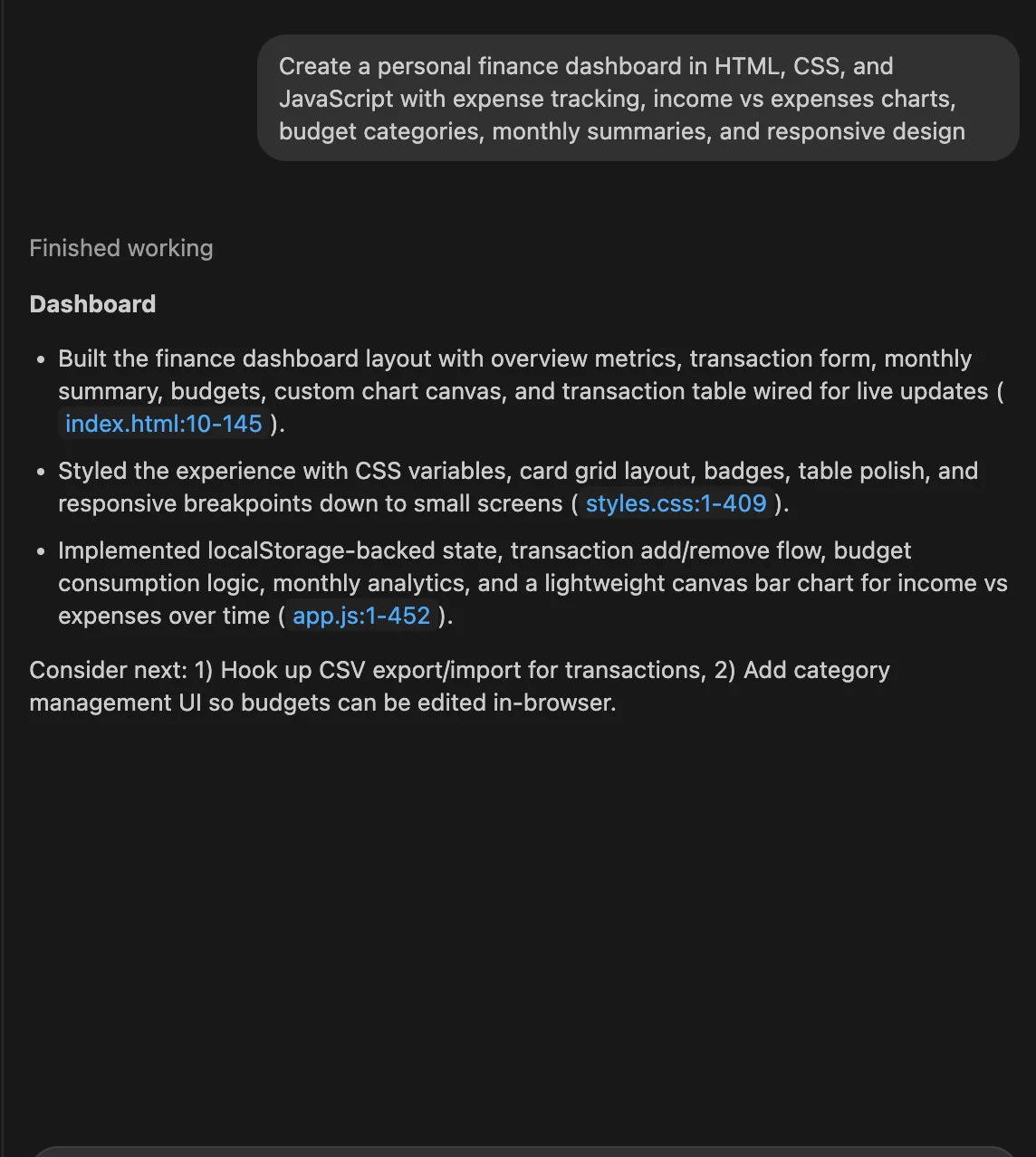
image of pasted prompt in Chatgpt 5 Codex
ChatGPT-5 Codex generates the basic dashboard structure with HTML layout, CSS styling, and JavaScript functionality for expense tracking and basic charts.
Step 3: Add data persistence and advanced features
Enhance the dashboard with a second prompt:
Add local storage functionality to save financial data, implement data export to CSV, add spending trend analysis with visual indicators, and create budget alert notifications when spending exceeds limits.This prompt adds persistent data storage so users don't lose their financial information, plus advanced analytics and alert systems for better budget management.
Step 4: Implement professional features and polish
Complete the dashboard with a final enhancement prompt:
Add a dark/light theme toggle, implement data import from bank statements, create detailed spending reports with pie charts, add financial goal tracking with progress bars, and improve the UI with animations and professional styling.The final prompt transforms the dashboard into a professional-grade application with theme options, bank data import capabilities, comprehensive reporting, and goal tracking features.
Step 5: Run the generated project
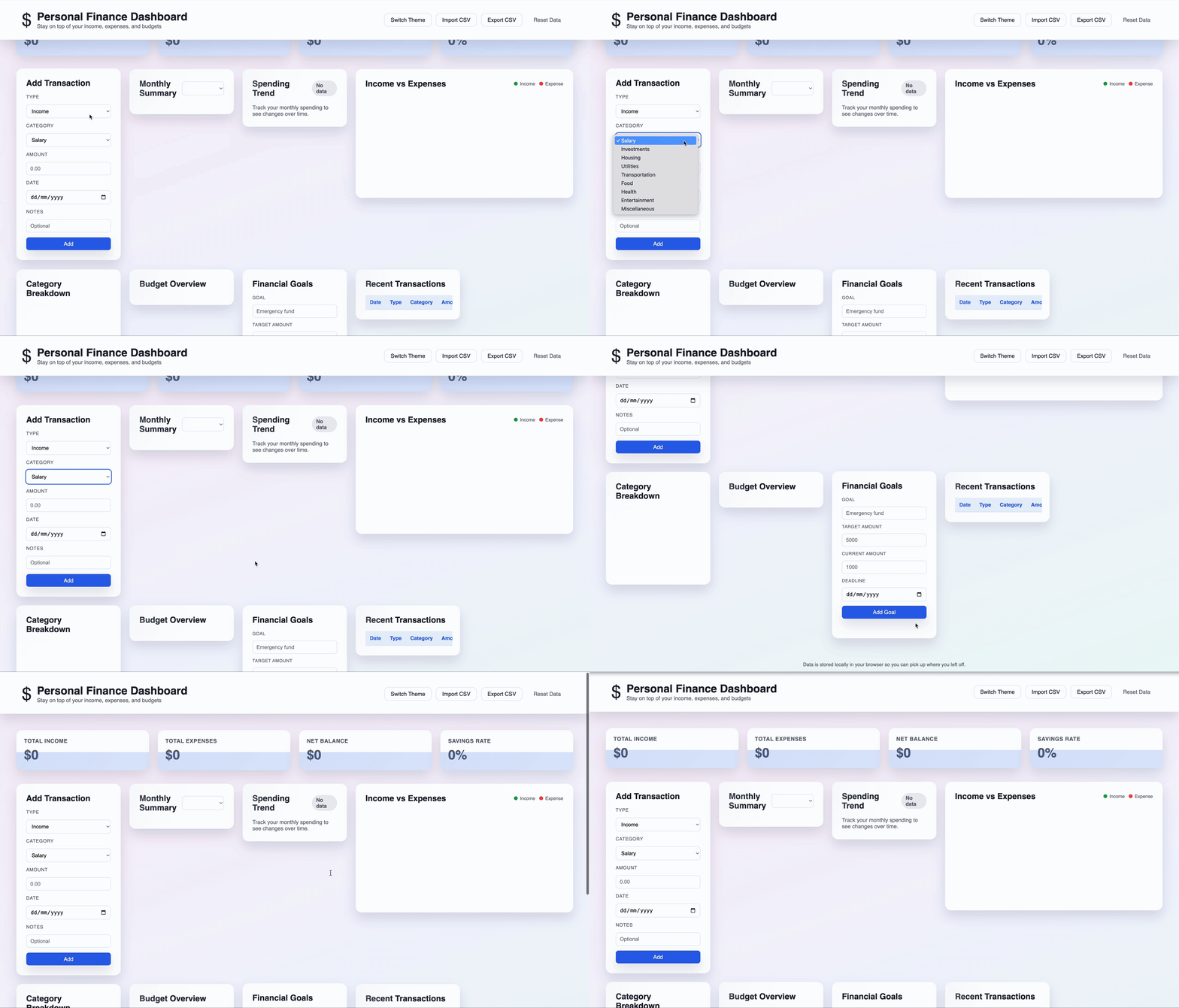
gif of results from chatgpt 5 codex
Open the HTML file in a web browser to test the complete dashboard. The advanced finance tracker now includes persistent data storage, CSV export/import, spending analysis, budget alerts, goal tracking, theme switching, and professional animations - all functional immediately with no additional setup required.
Performance benchmarks show how well ChatGPT-5 Codex handles real coding tasks.
ChatGPT-5 Codex performance and benchmarks
Image source: OpenAI
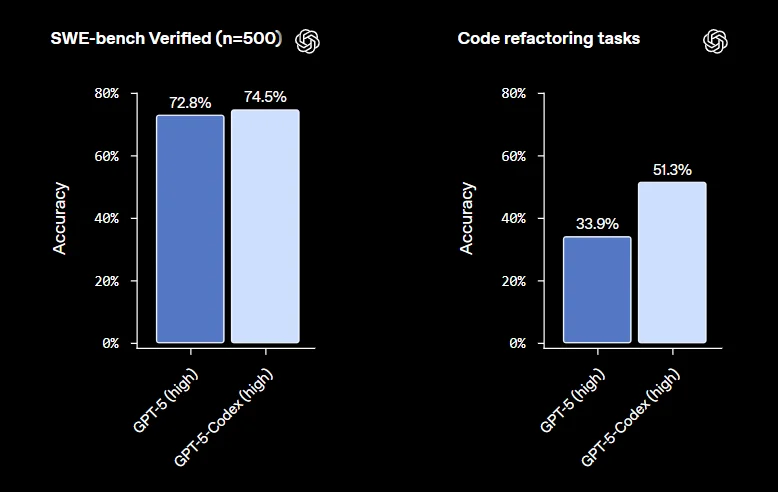
ChatGPT-5 Codex benchmarks
ChatGPT-5 Codex performs better than regular GPT-5 on coding tasks. It adapts how long it thinks based on the difficulty of the work.
On SWE-bench Verified, which tests real GitHub problems, ChatGPT-5 Codex gets 74.9% correct compared to GPT-5's 72.8%. This benchmark uses actual software engineering problems that developers solve daily.
The biggest improvement is in code refactoring. ChatGPT-5 Codex succeeds 51.3% of the time while GPT-5 only manages 33.9%. This shows better training for complex code changes.
The model can work alone for hours on difficult projects without needing help. It handles large coding tasks and maintains quality across different programming languages, including Python, Go, and OCaml.
GPT-5 sets new standards across multiple coding benchmarks, demonstrating superior accuracy and remarkable efficiency compared to competing models.
ChatGPT-5 software engineering benchmark results
Image source: OpenAI
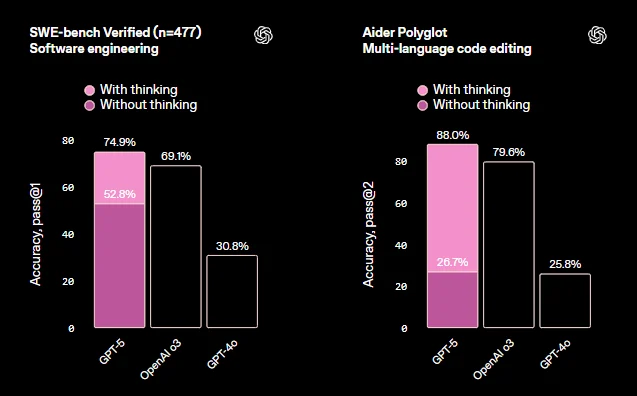
ChatGPT-5 Codex software engineering benchmarks
The comprehensive coding evaluation reveals GPT-5's dominance across two critical benchmarks:
SWE-bench Verified testing shows GPT-5 achieving 74.9% accuracy with thinking enabled, significantly outperforming OpenAI o3 (69.1%) and GPT-4o (30.8%). Without thinking, GPT-5 still manages 52.8% accuracy, demonstrating strong baseline performance.
Aider Polyglot multi-language code editing results show even more dramatic improvements. GPT-5 reaches 88.0% success with thinking - a substantial lead over o3's 79.6% and GPT-4o's 25.8%. This benchmark tests the model's ability to edit code across different programming languages effectively.
ChatGPT-5 Codex token efficiency breakthrough
Image source: OpenAI
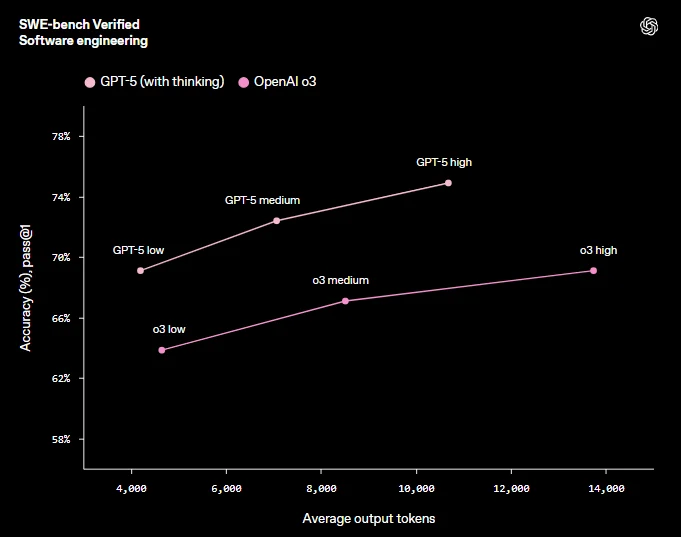
ChatGPT-5 Codex token efficiency
ChatGPT-5 broader AI performance metrics
Image source: OpenAI
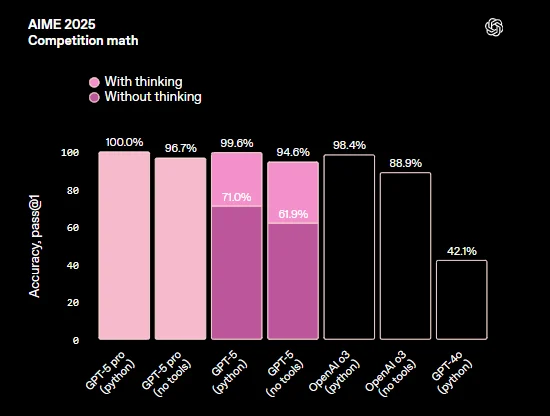
ChatGPT-5 Codex broader features
Beyond coding, GPT-5 demonstrates state-of-the-art performance across multiple domains. Key achievements include 94.6% on the AIME 2025 mathematics competition, 84.2% on MMMU multimodal understanding, and 46.2% on HealthBench Hard medical scenarios.
These results show GPT-5's reasoning capabilities extend far beyond code generation, making it a comprehensive tool for complex problem-solving across technical domains.
The model demonstrates 45% fewer factual errors than GPT-4o and 80% fewer hallucinations when using reasoning capabilities, establishing new reliability standards for AI-assisted development.
So how does it stack up against the competition?
ChatGPT-5 Codex vs Claude Code vs Cursor
ChatGPT-5 Codex competes with two major AI coding tools: Claude Code and Cursor. Each tool takes a different approach to AI-assisted development with unique strengths and pricing models.
Feature comparison table
Key differences analysis
ChatGPT-5 Codex excels at autonomous long-running tasks and complex refactoring projects. The tool generates performance-optimized code and can work independently for over seven hours on challenging tasks.
Claude Code produces more readable code with comprehensive explanations. It focuses on clarity and educational value, making it ideal for learning environments and team projects where code understanding matters.
Cursor provides seamless real-time editing within IDEs like VS Code. Its strength lies in context-aware suggestions during active development sessions and native editor integration.
The choice depends on specific needs: ChatGPT-5 Codex for autonomous development work, Claude Code for educational and readable code generation, and Cursor for real-time IDE assistance.
Conclusion
ChatGPT-5 Codex makes coding faster and more efficient. It can work on its own for hours, handles complex refactoring tasks, and integrates easily with existing ChatGPT subscriptions. The 74.9% success rate on real coding problems and major improvements in refactoring show it delivers real value.
The unified system with smart routing automatically decides when to think deeply versus respond quickly, while 45% fewer errors and 80% fewer hallucinations make it more reliable than previous models.
The tool works best for developers who need help with large projects, complex code changes, and time-consuming debugging tasks. It saves time on routine work while handling difficult programming challenges that usually take hours to complete.
ChatGPT-5 Codex is powered by GPT-5's advanced reasoning capabilities, making it the most sophisticated AI coding assistant available. For teams already using ChatGPT, adding Codex capabilities costs nothing extra.
If you want to get better at working with AI coding tools, take Codecademy's free course on how to use AI for coding.
Frequently asked questions
1. What is codex in ChatGPT?
Codex in ChatGPT refers to OpenAI's specialized AI coding assistant that integrates with ChatGPT subscriptions. It's designed specifically for software engineering tasks like writing code, debugging, and building complete applications. ChatGPT-5 Codex is the latest version optimized for autonomous coding work.
2. Does codex have GPT-5?
Yes, ChatGPT-5 Codex is powered by GPT-5 technology. It's a specialized version of GPT-5 that has been specifically trained and optimized for coding tasks. This version includes advanced reasoning capabilities and can work autonomously on complex programming projects for extended periods.
3. Is ChatGPT-5 available now?
Yes, ChatGPT-5 is available now since August 7, 2025. It's accessible to ChatGPT Plus, Pro, Team, Business, and Enterprise subscribers, with limited access for free users.
4. Is ChatGPT-5 better than GPT-4?
Yes, ChatGPT-5 significantly outperforms GPT-4. It achieves 74.9% on coding benchmarks compared to GPT-4o's 30.8%, has 45% fewer factual errors, and uses 50-80% fewer tokens while delivering higher accuracy.
'The Codecademy Team, composed of experienced educators and tech experts, is dedicated to making tech skills accessible to all. We empower learners worldwide with expert-reviewed content that develops and enhances the technical skills needed to advance and succeed in their careers.'
- What is ChatGPT-5 Codex
- Building an app with ChatGPT-5 Codex
- ChatGPT-5 Codex performance and benchmarks
- ChatGPT-5 Codex vs Claude Code vs Cursor
- Conclusion
- Frequently asked questions
Complete Payment to Unlock Full Guide & Source Code
You are viewing the 30% preview. Join TopCourseAI Pro to unlock the remaining 70% of this article, unblur all code snippets, and gain full access to all 412 technical projects and guides.
Ready to access the complete step-by-step tutorial?
Gain full unhindered access to all 412 technical projects and guides, unblur all source code snippets, and download runnable scripts.
How to Use ChatGPT Advanced Data Analysis
Next BlueprintHow to Use Chrome Web Developer Tools: Complete DevTools Guide
Related Blueprints & Guides
View all 166 →A Complete Guide to Vercel's AI SDK
Vercel AI SDK is a powerful TypeScript-first toolkit that provides a unified interface for building AI applications with Next.js and other modern frameworks. It eliminates the traditional complexity of managing multiple ...
AI Agents & AutomationAG-UI: How the Agent-User Interaction Protocol Works
AG-UI (Agent-User Interaction Protocol) is an open, lightweight protocol that standardizes the way AI agents interact with frontend apps. Consider it a common language that eliminates the need for custom integration code...
Generative AI FoundationsAI vs Generative AI: Understanding the Difference
Artificial Intelligence, or AI, is everywhere, from chatbots helping you shop to recommendation engines suggesting your next binge. Yet not all AI is the same, and the term is often used loosely, leaving many confused be...
Ready to build production-grade AI systems?
Enjoyed this guide? Continue exploring our library of 166+ production blueprints, multi-agent swarms, and autonomous agent systems with 100% unblurred, executable source code.