
How to Conduct Card Sorting
How to Conduct Card Sorting
A good information architecture is crucial for a product. You want to easily find what you’re looking for and understand how to get there, right? Imagine you’re on a website shopping for a new toaster. There’s a home appliance category, and an electronics category. Which category will you check to find your new toaster?
Card sorting allows designers to organize information in a way that makes sense to users, with the help of users! In a card sorting activity, participants are asked to organize cards into groups that make the most sense to them. Card sorting is often used to improve the information architecture of a website or any platform.
After reading this article, you will thoroughly understand the importance of card sorting, its benefits, and how to conduct a card sorting session of your own!
What is Card Sorting?
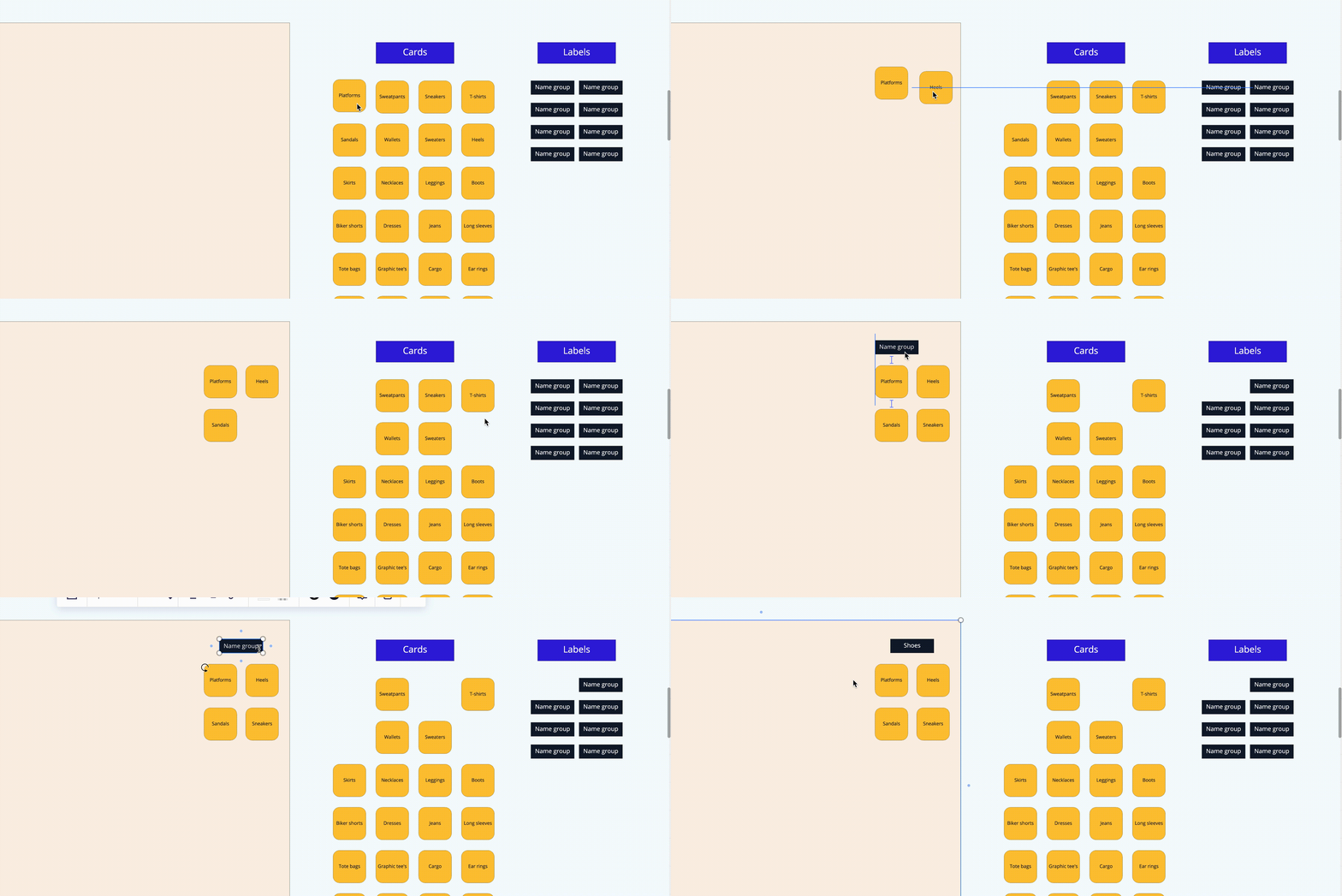
A GIF of someone doing a card sorting activity in Miro. The mouse is moving cards labeled "Platforms", "Heels", "Sandals", and "Sneakers" into a group called "Shoes".
Card sorting is a user research technique that requires participants to organize cards into groups. For this to happen, researchers are required to write down keywords on either paper or digital notecards. This method is often used during the early stages of the research phase and is frequently used for designing information architecture.
A card sorting session can take place during a one-on-one interview (moderated card sorting), or can be sent out to a large number of participants to complete in their own time (unmoderated card sorting). We’ll go into further details about moderated and unmoderated card sorting later!
Open Card Sorting
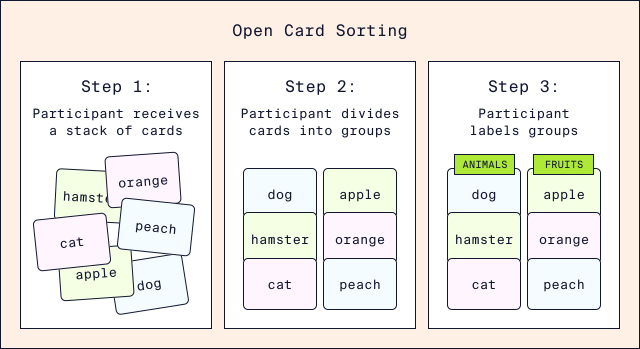
Diagram illustrating three steps of open card sorting. Step one: Participant receives a stack of cards. Step 2: Participant divides cards into groups. Step 3: Participant labels groups.
Open card sorting is when participants are given a stack of cards with topics and asked to categorize them in any number of groups. Afterward, participants are asked to name each group.
Closed Card Sorting
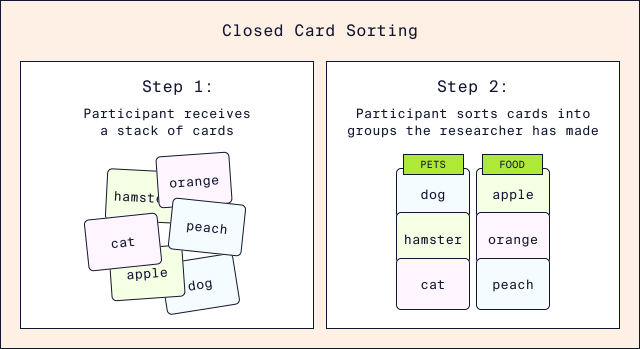
Diagram illustrating three steps of closed card sorting. Step one: Participant receives a stack of cards. Step 2: Participant sorts cards into groups the researcher has made.
Closed card sorting is when researchers create labels for categories and ask participants to sort the individual cards into named categories. In closed card sorting, researchers discover how well the existing structure supports information architecture from a user’s point of view. During a closed card sort, researchers are evaluating if participants will place the cards into the expected category.
Now that we have discussed two types of card sorting, let’s move over to discussing different types of card sorting sessions: moderated and unmoderated sessions.
Moderated Card Sorting
Moderated card sorting is when the researcher conducts a one-on-one interview with a participant to probe why the participant categorized the cards in one way or another. This type of session providesqualitativedata because researchers can ask follow-up questions and receive insights from participants as to why they placed a specific card in a certain group.
Unmoderated Card Sorting
Unmoderated card sorting requires participants to organize cards into their groups without a researcher overseeing the session, usually via an online tool. This method generatesquantitativedata and is good for conducting large-scale research. The researcher can send out the card sorting activity to many participants to complete in their own time.
One downside of unmoderated card sorting is that researchers are not able to ask follow-up questions, making it difficult to understand the reasoning behind why a participant placed a certain card in a category.
Let’s test your understanding of the different types and formats of card sorting!
Pros and Cons of Card Sorting
As we know, card sorting is a very effective way of developing information architecture. But, similar to every user research technique, there are pros and cons.
Pros
- Card sorting is simple for participants to understand.
- It is easy to conduct, whether you’re using physical or digital cards.
- Moderated open card sorting allows us to receive insight into a user’s thought process by providing qualitative data.
- Closed card sorting is a fast process that allows us to gain large amounts of data easily.
Cons:
- Card sorting assumes topics on each card have equal importance.
- When conducting closed card sort, the pre-created categories might not match what participants have in mind.
- Participants may not have context about your product, which can lead to misalignment in expectations.
- For example, let’s say you are looking to buy a baseball. If you are on a large retail website such as Amazon, you may just head over to the ‘Sports’ category to make your purchase. But if you are on a larger retail website such as Dick’s Sporting Goods, you may expect a more specific category name, like ‘Baseball’.
How to Conduct a Card Sorting Session
There are many tools you can use to conduct a card sorting session. In-person sessions can be done using pen and paper, index cards, or sticky notes.
Card sorting can also be conducted virtually using online tools. We suggestMirofor this, given it’s wide array of features and ease-of-use, but some other tools includeOptimal SortandFigJam.
Open Card Sorting with Miro
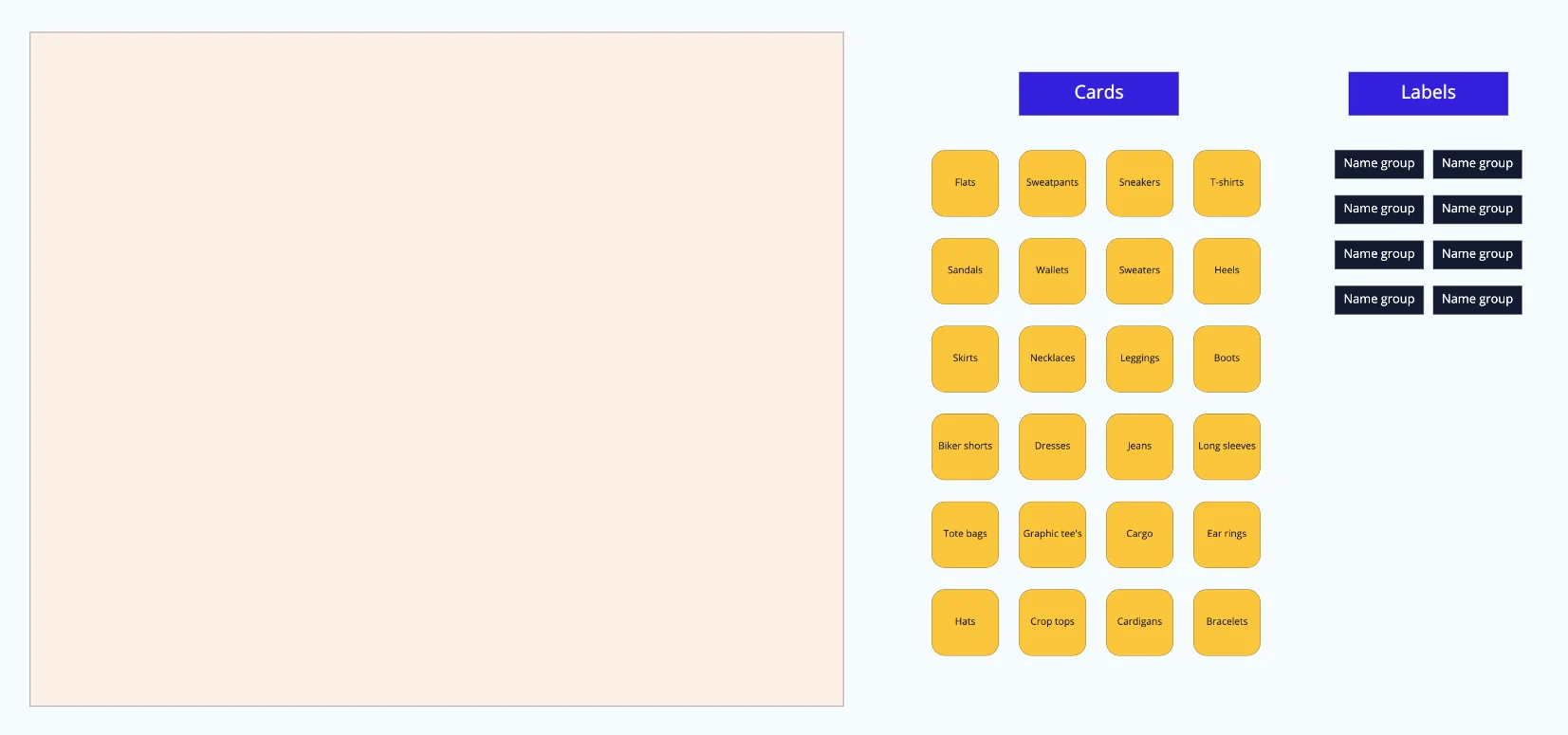
Let’s get started by conducting an open card sorting session! For this exercise, imagine you are a part of a clothing company. For our website, we want to discover how we should best organize and display our products to users. You can find our card sorting template here:Card Sorting Template.
The first thing you want to do is gather your set of topics for your cards.
Step One
Ensure that the layout you’ve provided for participants correlates to what type of card sort you want to conduct. For example, if you want to conduct an open card sort, it is as simple as laying the cards and labels out and allowing your participants to group the cards as they see fit. If you want to conduct a closed card sort, ensure you have categorized sections.
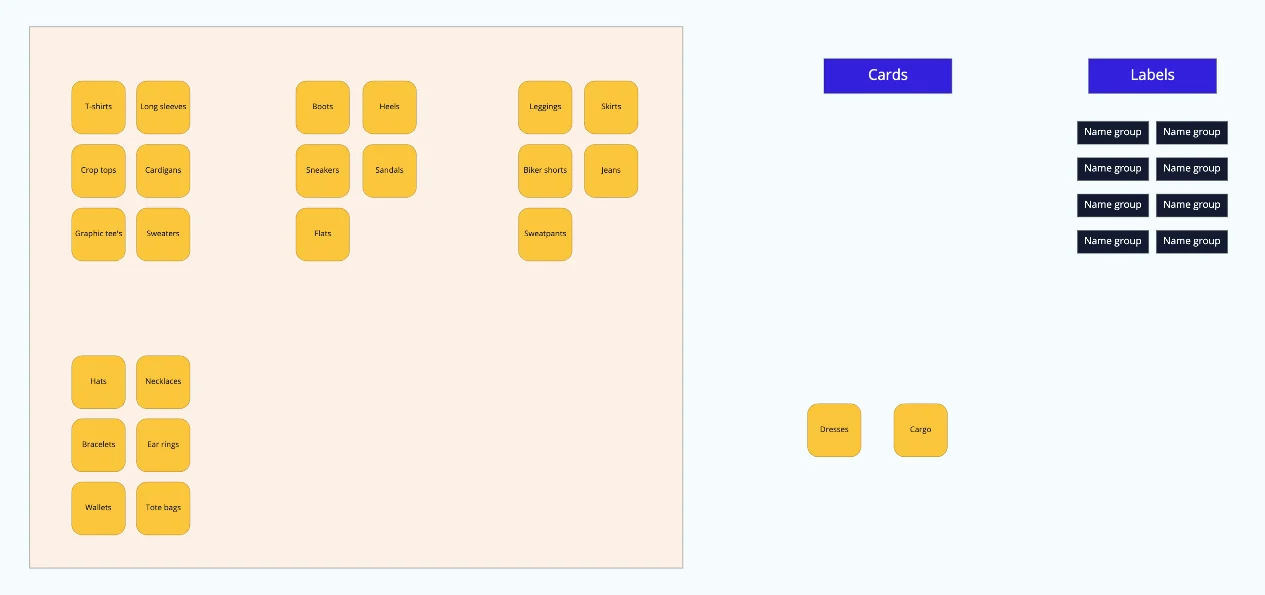
Step Two
Ask your participants to group the cards that are closely related.
💡 Tip: If you are conducting an open card sorting, ask your participants to think out loud! This would be something like them saying, “I placed crop-tops and t-shirts together because they are both shirts.”
Keep in mind that you should not aim for a group to have a certain amount of cards. Some cards will have more or less than others, and that is okay! It all depends on the participants.
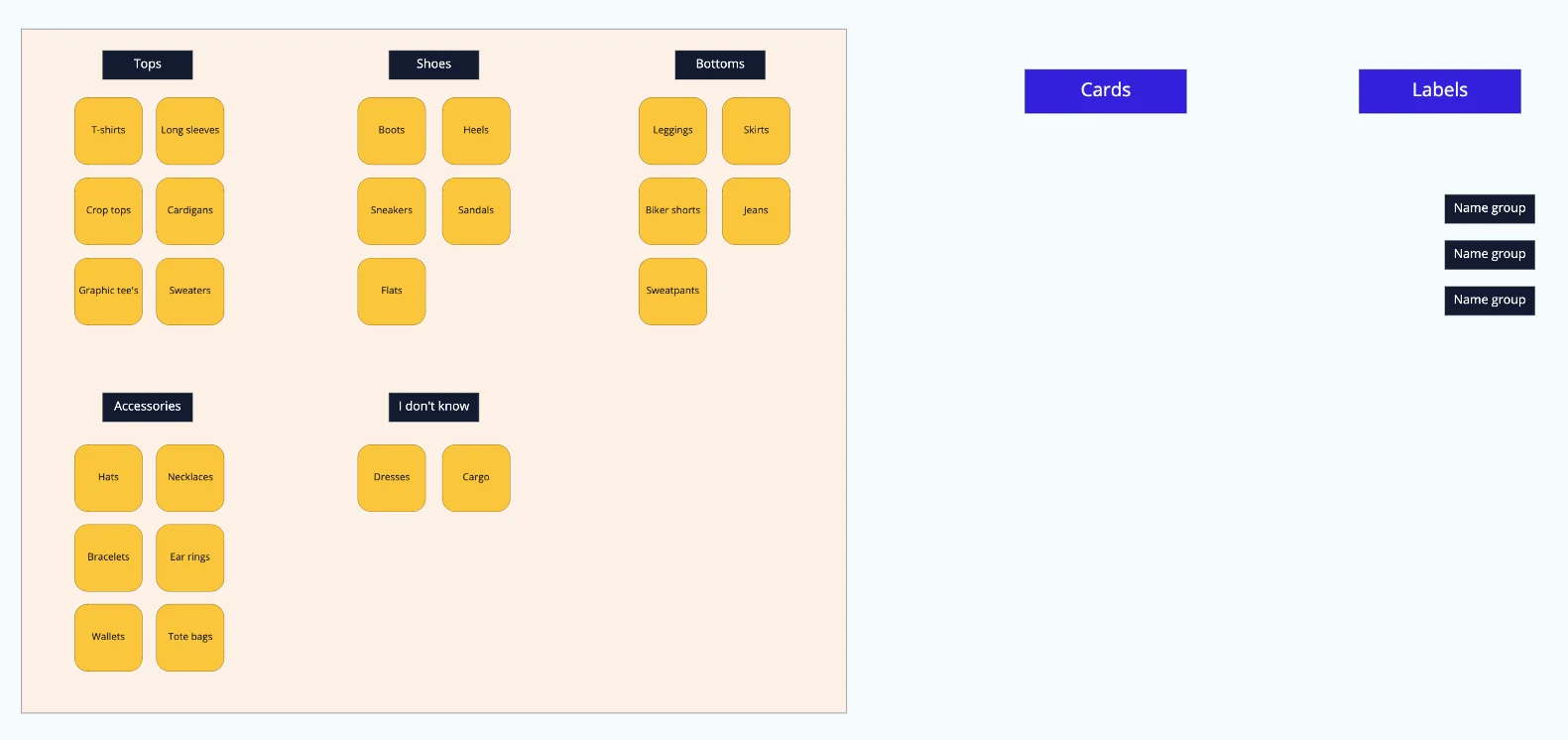
Step Three
If conducting an open card sort, ask the participants to put labels for the groups and name them! 💡 Tip: When conducting open card sorting, remind participants that it’s okay to create a category labeled “unsure”, “I don’t know”, or “other”. When conducting a closed card sort, make sure to already have this category created.
After completing a card sorting activity exercise, don’t hesitate to ask your participants more follow-up questions! For this card sorting example, some follow-up questions you should consider asking would be: “Would you be able to explain why you created an “I don’t know” section and placed “Dresses” and “Cargo” in this category? “How would you define ‘Accessories’?”
Try to take note of the participants’ answers to these questions! It will be useful in the next step of the process: analyzing the results of your card sorting session.
You’ve completed an open card sorting session! Compare yours to our example card sorting Miro board below.
Closed Card Sorting with OptimalSort
We can create closed card sorting using tools likeOptimalSort. Navigate to theCard sorting pageand follow the prompts to create a card sorting study. If you don’t have an account already, you’ll need to create one.
You can follow the general workflow of creating an open card sorting. Navigate around the tabs in your study’s Setup page to create cards and categories, and make any adjustments to the design.
Note that using the free plan of OptimalSort, you will be able to create up to 20 cards and save up to 10 participants’ responses. For further guidance, take a look at OptimalSort’sOnline Card Sorting: The Comprehensive Guidearticle.
Outcomes of Card Sorting
Now that you’ve completed card sorting, you are ready to organize and analyze your data.
Analyzing Qualitative Data
Moderated open card sorting will typically result in user-created categories as well as qualitative data from follow-up questions that provide insight into why the participant chose to place a card into a particular category. Take a look at theHow to Analyze Qualitative Dataarticle for an in-depth guide to organizing and analyzing qualitative data.
Analyzing Quantitative Data
Card sorting activities also result in quantitative data that reveal patterns of similarities and differences in how participants organized cards into groups. Online card sorting platforms like OptimalSort generate various data visualizations such as similarity matrix, results matrix, anddendrograms. These visualizations help make insights from card sorting results easier to identify.
Take a look at OptimalSort’s How to Interpret Your Card Sort Results articles (Part 1andPart 2) to dive further into how to analyzing and interpret quantitative data from card sorting.
Conclusion
In this article, we covered what card sorting is, the different types of sessions and tools, how to conduct your card sorting session with the recommended tools, and how to analyze your card sorting data.
With this knowledge, you should be able to successfully conduct your card sort to create an effective information architecture for your users.
'The Codecademy Team, composed of experienced educators and tech experts, is dedicated to making tech skills accessible to all. We empower learners worldwide with expert-reviewed content that develops and enhances the technical skills needed to advance and succeed in their careers.'
Complete Payment to Unlock Full Guide & Source Code
You are viewing the 30% preview. Join TopCourseAI Pro to unlock the remaining 70% of this article, unblur all code snippets, and gain full access to all 412 technical projects and guides.
Ready to access the complete step-by-step tutorial?
Gain full unhindered access to all 412 technical projects and guides, unblur all source code snippets, and download runnable scripts.
How do Vision Transformers Work? Architecture Explained
Next BlueprintHow to Select a Meaningful Visualization
Related Blueprints & Guides
View all 166 →CSS Glossary
Comments in CSS are signified by a forward-slash and asterisk.
Web designInline Styles in HTML
Usually, CSS is written in a separate CSS file (with file extension.css) or in a<style>tag inside of the<head>tag, but there is a third place which is also valid. The third place you can write CSS is inside of an HTML ta...
Web designManaging Assets and Icons
In this article, you will learn how to manage icons and assets using web-based tools.
Ready to build production-grade AI systems?
Enjoyed this guide? Continue exploring our library of 166+ production blueprints, multi-agent swarms, and autonomous agent systems with 100% unblurred, executable source code.