
From Editor to Output
From Editor to Output
How does a program work? From our perspective, we write some code, run it, and then something (usually) appears in the output terminal; however, that isn’t the full story. In this article, we’re going to break down all of the work and processes that happen between running our Kotlin code and seeing its output.
Behind the Scenes
When we run a program, a series of processes work together to evaluate and format the code as needed. This process varies by language, but in Kotlin it looks like this:

Diagram showing flow of code evaluation from the editor to the compiler (kotlinc) to the JVM and then the output window
First, the compiler evaluates our entire program and ensures that it does not contain any errors. It then translates our source code to Java bytecode in the form of.classfiles. These files then get passed on to the JVM.
JVM stands for Java Virtual Machine and is the software responsible for executing Java bytecode given to it from a compiler. The JVM doesn’t understandprogramminglanguages like Kotlin; instead, it speaks to and analyzes bytecode. The JVM then executes these instructions in the order they were given. Once the JVM completes the final instruction, it terminates - meaning our program has been fully executed.
What happens when there’s an error?
Since Kotlin is a statically compiled language, its code gets translated and its types are checked before run time, specifically during compilation. Any errors in our code get caught during this phase. If the compiler recognizes an error, it displays an error message in the output terminal and terminates the rest of the processes as shown below:
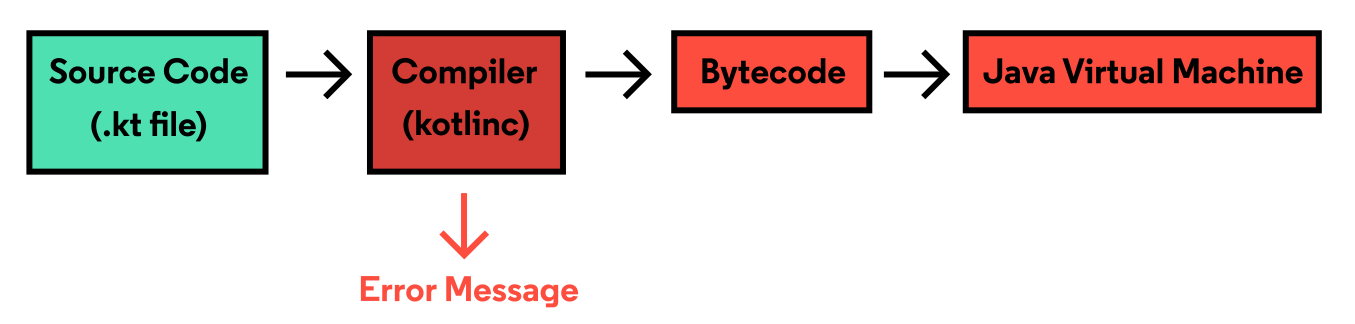
Diagram showing the flow of code evaluation from the editor to the compiler (kotlinc) to the JVM. The box is read at the compiler phase to demonstrate an error
The bytecode is never generated, the JVM is never reached, and finally, our code’s output is not displayed. Assuming we have an error such as this one:
Error.kt:2:25: error: expecting ')'
  println("Hello, World"
                        ^
Until we resolve this error by adding a)and rerunning our code, we will not be able to see any output.
No Kotlin supported IDE? No problem!
In the case that we’re off the Codecademy platform and writing our Kotlin code locally in anIDEwithout a built-in converter between Kotlin and Java code, we can rely on the bash terminal.
The bash terminal is a command language interpreter that has the ability to execute a series of commands contained in a script or program. With Kotlin installed, we can run a series of commands which will manually compile our code, execute it, and display its output. Take a look at how it’s done manually.
Assume we have the following program in aHelloWorld.ktfile:
fun main() {  println("Hello, World!")}
Copy to clipboard
fun main() { println("Hello, World!")}In the bash terminal, we can enter the first command to compile our code and save it in a.jarfile:
$ kotlinc HelloWorld.kt -include-runtime -d HelloWorld.jar
Copy to clipboard
$ kotlinc HelloWorld.kt -include-runtime -d HelloWorld.jar- kotlincrepresents the compiler.
- HelloWorld.ktrepresents the source code file that we need to compile into Java bytecode.
- The-include-runtimeoption results in the.jarfile being runnable by including the Kotlin runtime library within it.
- The.jarextension represents a file format that indicates many Java files zipped into one. When executed, Java can extract and use its information.
- The-dflag specifies the output path for the newly generated class files.
After we’ve hit enter, we can then run our program with the following command:
java -jar HelloWorld.jar- Thejavacommand launches an application written in Java. It does this by starting the JVM, loading the.classfile, and executing the code within themain()function.
- By specifying the-jarflag, we are instructing Java to execute a program within a.jarfile.
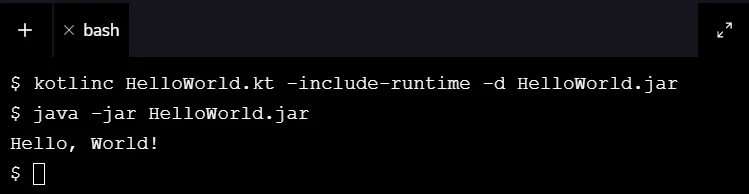
Both commands are used in the Bash terminal and the result, Hello, World!, is outputted.
Note: If we make changes to our code, we’d need to recompile our program and run the above two commands again.
You’ve reached the end of the article - great job! We covered a vast majority of information that gives us insight into what happens after we run our Kotlin code.
We now understand that our Kotlin code needs to be compiled into bytecode before it can be passed on to the Java Virtual Machine which executes the code as instructions. IDEs often automatically compile our code, but if we don’t have that luxury, we can use a bash terminal to manually compile and execute our program. Next time you’re running your code, you’ll know what’s happening from editor to output. And if you want to learn more about how to use your bash terminal, check out ourBash courses.
'The Codecademy Team, composed of experienced educators and tech experts, is dedicated to making tech skills accessible to all. We empower learners worldwide with expert-reviewed content that develops and enhances the technical skills needed to advance and succeed in their careers.'
Complete Payment to Unlock Full Guide & Source Code
You are viewing the 30% preview. Join TopCourseAI Pro to unlock the remaining 70% of this article, unblur all code snippets, and gain full access to all 412 technical projects and guides.
Ready to access the complete step-by-step tutorial?
Gain full unhindered access to all 412 technical projects and guides, unblur all source code snippets, and download runnable scripts.
Related Blueprints & Guides
View all 166 →Accessibility on the Platform
Codecademy is committed to providing a high-quality learning experience for all learners. That includes accommodating different usage forms such as auditory, motor, or visual restrictions, limited hardware, or other acce...
Web developmentAffordances, Signifiers, and Clickability
For users on the web, the mouse click is perhaps the most fundamental human-computer interaction. The webbecamethe web partially through the power ofhypertext, or text in one document that links to other documents or res...
Web developmentAuthentication and OAuth
Authenticationis the process used by applications to determine and confirm identities of users. It ensures that the correct content is shown to users. More importantly, it ensures that incorrect content is secured and u...
Ready to build production-grade AI systems?
Enjoyed this guide? Continue exploring our library of 166+ production blueprints, multi-agent swarms, and autonomous agent systems with 100% unblurred, executable source code.