
Deploying to GitHub Pages
Deploying to GitHub Pages
GitHubis a great tool to store projects and to collaborate with others, but its usefulness does not stop there. We’ll use a service called GitHub Pages to share our web page creations on the World Wide Web.
What is GitHub Pages?
There are many different ways to deploy a website to the public Internet. We’ll be using GitHub’s free service called GitHub Pages.
Why GitHub Pages? GitHub Pages offers a lot of features and flexibility, all for free. Some of the benefits include:
- Easy setup
- Seamless collaboration using Git and GitHub
- Free hosting with >95% uptime
- Live updating with normal GitHub workflow
What is Deploying?
Deploying is like publishing. When authors are ready for their work to be seen by the world, they publish it. When web developers are ready to share their projects, they deploy to the World Wide Web. Deployment is when a project is packaged and shared on the Internet. Unlike publishing, however, deployment may occur many, many times over the course of a software project.
Deployment on GitHub Pages
Deploying to GitHub Pages is automatic. Once it’s set up, deploying happens whenever you push your local changes to your remote, GitHub-hosted repository. Head to GitHub Pages’setup instructionsand follow the steps exactly to get your main GitHub Pages page setup.
When you first navigate to your newly deployed site it is possible that you will receive a 404 error. If this happens, and you are confident that you have followed all the steps as written, check back in 30 minutes to see if the deploy has successfully gone through.
Viewing Your Live Web Page
That’s it! Your website is deployed to the Internet! You and anyone with whom you share this link can view your project by navigating in your browser to the URLhttp://<your-github-username>.github.io.
Adding GitHub Pages Projects
You can set up your GitHub Pages to deploy every one of your repositories in addition to<username>.github.io. This will allow you to ensure all of your sites are deployed automatically whenever you push to GitHub.
In GitHub, navigate to your<username>.github.iorepository and clickSettings.

githubSettings
WithinSettings, navigate to theSourcesection within theGithub Pagessection. From the dropdown menus, ensure that themainbranch and the/(root)directory are selected, then clickSave.
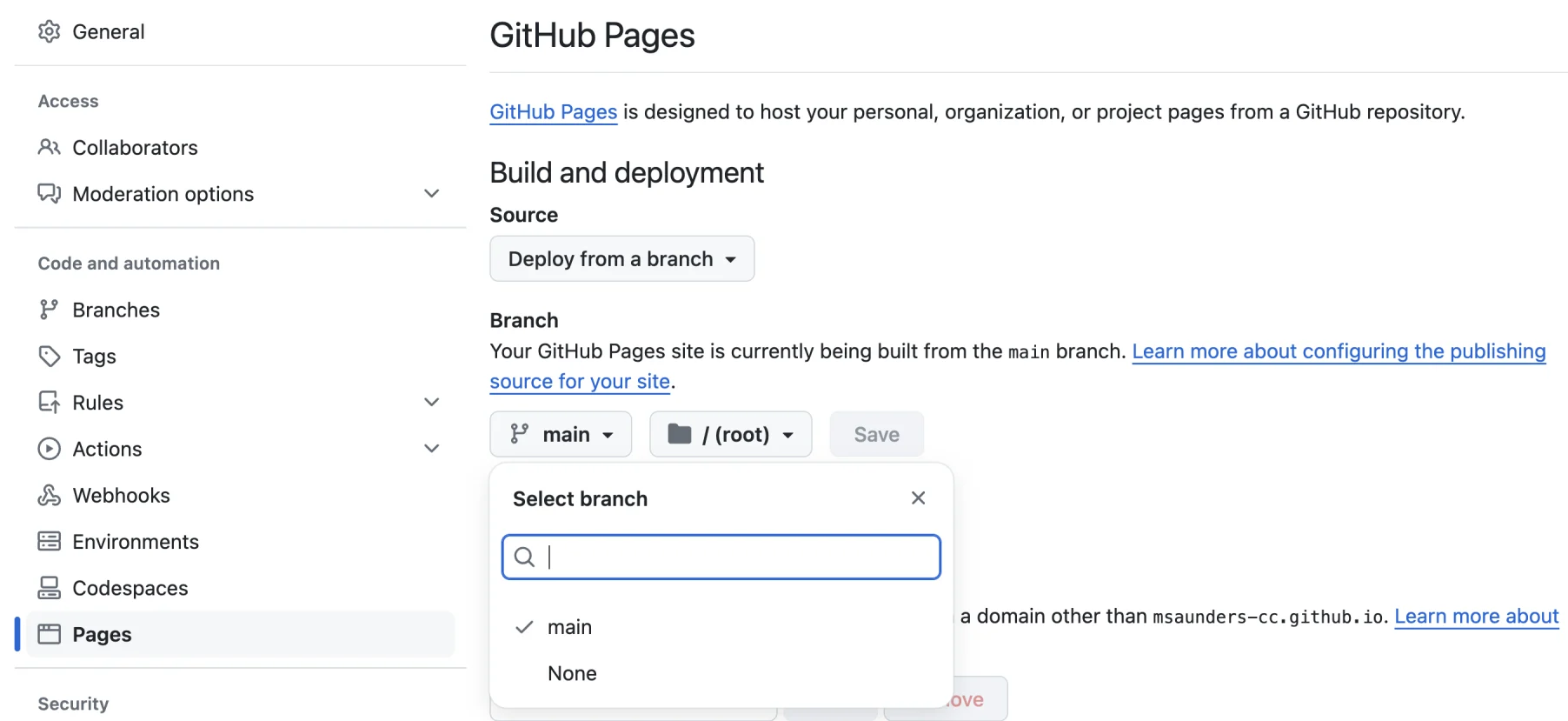
githubPagesSection
Now, all of your repositories can be found athttp://<username>.github.io/<repository-name>. Try creating a new repo with an HTML project inside it (perhaps push an old project to GitHub) and then navigate to the deployed page.
Deploying New Changes
Now that your GitHub Pages site is set up, deploying new changes is easy. Every time you make a change to your site, use the normal GitHub flow. That is, usegit commitandgit pushto send your changes to GitHub. After this, the GitHub site should update within a few seconds. Just refresh the page in your browser, and you’re good to go!
Congratulations on your first live web page!
'The Codecademy Team, composed of experienced educators and tech experts, is dedicated to making tech skills accessible to all. We empower learners worldwide with expert-reviewed content that develops and enhances the technical skills needed to advance and succeed in their careers.'
Complete Payment to Unlock Full Guide & Source Code
You are viewing the 30% preview. Join TopCourseAI Pro to unlock the remaining 70% of this article, unblur all code snippets, and gain full access to all 412 technical projects and guides.
Ready to access the complete step-by-step tutorial?
Gain full unhindered access to all 412 technical projects and guides, unblur all source code snippets, and download runnable scripts.
Deploying a Static Site with Netlify
Next BlueprintDepth-First Search: Conceptual
Related Blueprints & Guides
View all 166 →Accessibility on the Platform
Codecademy is committed to providing a high-quality learning experience for all learners. That includes accommodating different usage forms such as auditory, motor, or visual restrictions, limited hardware, or other acce...
Web developmentAffordances, Signifiers, and Clickability
For users on the web, the mouse click is perhaps the most fundamental human-computer interaction. The webbecamethe web partially through the power ofhypertext, or text in one document that links to other documents or res...
Web developmentAuthentication and OAuth
Authenticationis the process used by applications to determine and confirm identities of users. It ensures that the correct content is shown to users. More importantly, it ensures that incorrect content is secured and u...
Ready to build production-grade AI systems?
Enjoyed this guide? Continue exploring our library of 166+ production blueprints, multi-agent swarms, and autonomous agent systems with 100% unblurred, executable source code.