
What is One Hot Encoding and How to Implement it in Python?
What is One Hot Encoding and How to Implement it in Python?
When working with real-world datasets, attributes like gender, color, names of places, and product type contain vital information that can help build efficientmachine learning (ML)models. As ML models understand only numeric values, we must convert the categorical values into numeric format. For this task, we can use one-hot encoding as it helps preserve the categorical nature of the data without introducing unintended relationships. In this article, we will discuss one-hot encoding, why it’s useful, and how to implement it in Python using popular libraries likepandasandscikit-learn.
What is one-hot encoding?
One-hot encoding is a data encoding technique used to convert categorical features of a dataset into numeric features. If a categorical feature has N unique values, we create N new binary columns in the dataset for one-hot encoding. Each new column represents a unique value in the existing categorical feature. If the existing categorical column contains the value represented by a new column, the value in the new column is set to 1. Values in the rest of the new columns are set to 0.
One-hot encoding example
To understand how one-hot encoding works, consider the following table.
In this table, we have aColorcolumn with categorical values having three unique values, i.e.,Blue,Green, andRed. To convert this categorical column into numeric values using one-hot encoding, we will create three new columns in the dataset where each new column will represent a unique color value.
Next, we will scan each row in theColorcolumn and set the values in the new columns.
- For theColorvalueBlue, we will set the value in theColor_Bluecolumn to1. The rest of the new columns in the row will be set to0.
- For theColorvalueGreen, we will set the value in theColor_Greencolumn to1. The rest of the new columns in the row will be set to0.
- For theColorvalueRed, we will set the value in theColor_Redcolumn to1. The rest of the new columns in the row will be set to0.
After the above transformation, we get the following table:
In this table, we can obtain the color information of the products from theColor_Red,Color_Blue, andColor_Greencolumns. Hence, theColorcolumn is no longer required. We will delete this column, as shown in the following table:
As you can see, we have successfully converted the categorical values in theColorcolumn to numeric attributes using one-hot encoding. Now, let’s discuss how we can implement one-hot encoding using different approaches in Python.
Implementing one-hot encoding in Python
In Python, we can implement one-hot encoding using theget_dummies()function in thepandasmodule and theOneHotEncoderclass in thesklearnmodule. Let’s discuss both of these approaches.
Implement one-hot encoding using pandas in Python
Theget_dummies()function gives us a straightforward implementation of one-hot encoding in Python. To discuss how it works, let’s first create adataframeusing the data provided in the example table.
import pandas as pd  # Define dataset data=[['P1001',1099,'Red'],       ['P1002',999,'Blue'],       ['P1003',499,'Green'],       ['P1004',999,'Red'],       ['P1005',1499,'Blue']]  # Create dataframe product_data=pd.DataFrame(data, columns=["Product_ID", "Price", "Color"]) print("The dataset is:") print(product_data)
Copy to clipboard
import pandas as pd # Define dataset data=[['P1001',1099,'Red'], ['P1002',999,'Blue'], ['P1003',499,'Green'], ['P1004',999,'Red'], ['P1005',1499,'Blue']] # Create dataframe product_data=pd.DataFrame(data, columns=["Product_ID", "Price", "Color"]) print("The dataset is:") print(product_data)Output:
The dataset is:   Product_ID  Price  Color 0      P1001   1099    Red 1      P1002    999   Blue 2      P1003    499  Green 3      P1004    999    Red 4      P1005   1499   Blue
Copy to clipboard
The dataset is: Product_ID Price Color 0 P1001 1099 Red 1 P1002 999 Blue 2 P1003 499 Green 3 P1004 999 Red 4 P1005 1499 BlueTheget_dummies()function takes a dataframe as its first input argument and a list of column names as input to thecolumnsparameter. After execution, it returns a dataframe in which the columns given as input to thecolumnsparameter are transformed using one-hot encoding, as shown in the following example:
# One-hot encoding using pandas get_dummies() function product_data_encoded=pd.get_dummies(product_data, columns=["Color"]) print("The encoded data is:") print(product_data_encoded)
Copy to clipboard
# One-hot encoding using pandas get_dummies() function product_data_encoded=pd.get_dummies(product_data, columns=["Color"]) print("The encoded data is:") print(product_data_encoded)The encoded data is: Product_ID Price Color_Blue Color_Green Color_Red 0 P1001 1099 False False True 1 P1002 999 True False False 2 P1003 499 False True False 3 P1004 999 False False True 4 P1005 1499 True False False
Copy to clipboardThe encoded data is: Product_ID Price Color_Blue Color_Green Color_Red 0 P1001 1099 False False True 1 P1002 999 True False False 2 P1003 499 False True False 3 P1004 999 False False True 4 P1005 1499 True False FalseIn the output, you can see that the originalColorcolumn is dropped. Also, the one-hot encoded columns contain boolean values. To get one-hot encoded columns with integers, you can set thedtypeparameter tointin theget_dummies()function. You can also set thedtypeparameter tofloatfor floating point output.
# Get 1/0 encoding instead of True/False product_data_encoded=pd.get_dummies(product_data, columns=["Color"], dtype=int) print("The encoded data is:") print(product_data_encoded)
Copy to clipboard
# Get 1/0 encoding instead of True/False product_data_encoded=pd.get_dummies(product_data, columns=["Color"], dtype=int) print("The encoded data is:") print(product_data_encoded)The encoded data is: Product_ID Price Color_Blue Color_Green Color_Red 0 P1001 1099 0 0 1 1 P1002 999 1 0 0 2 P1003 499 0 1 0 3 P1004 999 0 0 1 4 P1005 1499 1 0 0
Copy to clipboardThe encoded data is: Product_ID Price Color_Blue Color_Green Color_Red 0 P1001 1099 0 0 1 1 P1002 999 1 0 0 2 P1003 499 0 1 0 3 P1004 999 0 0 1 4 P1005 1499 1 0 0In this output, you can see that the one-hot encoded columns have 0s and 1s as we set thedtypeparameter tointin theget_dummies()function.
We can also perform one-hot encoding on multiple columns at once using theget_dummies()function in Python. For this, we need to pass all the column names we want to encode in a list to thecolumnsparameter. To understand this, let’s add aSegmentcolumn to the dataset and perform one-hot encoding on theColorandSegmentcolumns.
import pandas as pd  # Define data with two categorical columns data=[['P1001',1099,'Red','Men'],       ['P1002',999,'Blue','Women'],       ['P1003',499,'Green','Men'],       ['P1004',999,'Red','Kids'],       ['P1005',1499,'Blue','Boys']]  product_data_with_segment=pd.DataFrame(data, columns=["Product_ID", "Price", "Color", "Segment"]) print("The dataset is:") print(product_data_with_segment) product_data_encoded=pd.get_dummies(product_data_with_segment, columns=["Color","Segment"], dtype=int) print("The encoded data is:") print(product_data_encoded)
Copy to clipboard
import pandas as pd # Define data with two categorical columns data=[['P1001',1099,'Red','Men'], ['P1002',999,'Blue','Women'], ['P1003',499,'Green','Men'], ['P1004',999,'Red','Kids'], ['P1005',1499,'Blue','Boys']] product_data_with_segment=pd.DataFrame(data, columns=["Product_ID", "Price", "Color", "Segment"]) print("The dataset is:") print(product_data_with_segment) product_data_encoded=pd.get_dummies(product_data_with_segment, columns=["Color","Segment"], dtype=int) print("The encoded data is:") print(product_data_encoded)The dataset is: Product_ID Price Color Segment 0 P1001 1099 Red Men 1 P1002 999 Blue Women 2 P1003 499 Green Men 3 P1004 999 Red Kids 4 P1005 1499 Blue Boys The encoded data is: Product_ID Price Color_Blue Color_Green Color_Red Segment_Boys Segment_Kids Segment_Men Segment_Women 0 P1001 1099 0 0 1 0 0 1 0 1 P1002 999 1 0 0 0 0 0 1 2 P1003 499 0 1 0 0 0 1 0 3 P1004 999 0 0 1 0 1 0 0 4 P1005 1499 1 0 0 1 0 0 0
Copy to clipboardThe dataset is: Product_ID Price Color Segment 0 P1001 1099 Red Men 1 P1002 999 Blue Women 2 P1003 499 Green Men 3 P1004 999 Red Kids 4 P1005 1499 Blue Boys The encoded data is: Product_ID Price Color_Blue Color_Green Color_Red Segment_Boys Segment_Kids Segment_Men Segment_Women 0 P1001 1099 0 0 1 0 0 1 0 1 P1002 999 1 0 0 0 0 0 1 2 P1003 499 0 1 0 0 0 1 0 3 P1004 999 0 0 1 0 1 0 0 4 P1005 1499 1 0 0 1 0 0 0In this example, we have transformed theColorandSegmentcolumns using one-hot encoding by passing the list["Color","Segment"]to thecolumnsparameter in theget_dummies()function. If you want to encode more categorical columns, you can add the column names to the list.
In addition to pandas, Python has the feature-rich sklearn library, which provides multiple functions for data analysis and machine learning tasks. Let’s discuss how to perform one-hot encoding using the sklearn module in Python.
Implement one-hot encoding using OneHotEncoder in Python
The sklearn module provides us with theOneHotEncoderclass, which we can use to train, save, and reuse encoders for one-hot encoding. To implement one-hot encoding using theOneHotEncoderclass, we will first create an encoder, train it, and then use it for one-hot encoding. We can also save and reload the encoder, as discussed in the following subsections.
First, we will create a one-hot encoder object using theOneHotEncoder()constructor. By default,OneHotEncoderreturns a sparse matrix after encoding. To get one-hot encoded columns instead of a sparse matrix, we will set thesparse_outputparameter toFalse. Also, theOneHotEncoderruns into an error if the input data has different values compared to the training data. To avoid the error and ignore any new values, we will also set thehandle_unknownparameter toignore.
from sklearn.preprocessing import OneHotEncoder  # Create an encoder encoder= OneHotEncoder(sparse_output=False, handle_unknown='ignore')
Copy to clipboard
from sklearn.preprocessing import OneHotEncoder # Create an encoder encoder= OneHotEncoder(sparse_output=False, handle_unknown='ignore')After creating the one-hot encoder, we will train it using the categorical values. We will first create a dataframe using only the given column to train the one-hot encoder for a single column. Next, we will invoke thefit()method on theOneHotEncoderobject and pass the dataframe containing the categorical column to thefit()method. After executing thefit()method, we get a trained one-hot encoder.
- To get the name of the one-hot encoded features, you can invoke theget_feature_names_out()method on the trained encoder.
- To perform one-hot encoding on new data, you can invoke thetransform()method on the trained one-hot encoder and pass the data as an input argument. Thetransform()method returns a 2D array containing one-hot encoded values.
You can perform one-hot encoding on theColorcolumn usingOneHotEncoderas shown in the following example:
# Train the encoder using the `Color` column color_df=product_data[['Color']]  encoder.fit(color_df)  # Get encoded column names encoded_columns=encoder.get_feature_names_out()  # Transform data using the trained encoder encoded_colors = encoder.transform(color_df)  print("The encoded data is:") print(encoded_colors) print("The encoded columns are:") print(encoded_columns)
Copy to clipboard
# Train the encoder using the `Color` column color_df=product_data[['Color']] encoder.fit(color_df) # Get encoded column names encoded_columns=encoder.get_feature_names_out() # Transform data using the trained encoder encoded_colors = encoder.transform(color_df) print("The encoded data is:") print(encoded_colors) print("The encoded columns are:") print(encoded_columns)The encoded data is: [[0. 0. 1.] [1. 0. 0.] [0. 1. 0.] [0. 0. 1.] [1. 0. 0.]] The encoded columns are: ['Color_Blue' 'Color_Green' 'Color_Red']
Copy to clipboardThe encoded data is: [[0. 0. 1.] [1. 0. 0.] [0. 1. 0.] [0. 0. 1.] [1. 0. 0.]] The encoded columns are: ['Color_Blue' 'Color_Green' 'Color_Red']After performing one-hot encoding on theColorcolumn, we can merge the encoded data to the original dataframe. For this, we will first create a dataframe of encoded values using the transformed data and the encoded column names. Next, we will merge the new dataframe with the original dataframe using thepd.concat()function. Finally, we will drop the originalColorcolumn, which contains categorical values.
# Create a dataframe using the encoded data encoded_df=pd.DataFrame(encoded_colors, columns=encoded_columns) print("Encoded dataframe is:") print(encoded_df)  # Merge encoded data into the original dataframe and drop the `Color` column product_data_encoded=pd.concat([product_data,encoded_df],axis=1).drop(["Color"], axis=1) print("Merged data is:") print(product_data_encoded)
Copy to clipboard
# Create a dataframe using the encoded data encoded_df=pd.DataFrame(encoded_colors, columns=encoded_columns) print("Encoded dataframe is:") print(encoded_df) # Merge encoded data into the original dataframe and drop the `Color` column product_data_encoded=pd.concat([product_data,encoded_df],axis=1).drop(["Color"], axis=1) print("Merged data is:") print(product_data_encoded)Encoded dataframe is: Color_Blue Color_Green Color_Red 0 0.0 0.0 1.0 1 1.0 0.0 0.0 2 0.0 1.0 0.0 3 0.0 0.0 1.0 4 1.0 0.0 0.0 Merged data is: Product_ID Price Color_Blue Color_Green Color_Red 0 P1001 1099 0.0 0.0 1.0 1 P1002 999 1.0 0.0 0.0 2 P1003 499 0.0 1.0 0.0 3 P1004 999 0.0 0.0 1.0 4 P1005 1499 1.0 0.0 0.0
Copy to clipboardEncoded dataframe is: Color_Blue Color_Green Color_Red 0 0.0 0.0 1.0 1 1.0 0.0 0.0 2 0.0 1.0 0.0 3 0.0 0.0 1.0 4 1.0 0.0 0.0 Merged data is: Product_ID Price Color_Blue Color_Green Color_Red 0 P1001 1099 0.0 0.0 1.0 1 P1002 999 1.0 0.0 0.0 2 P1003 499 0.0 1.0 0.0 3 P1004 999 0.0 0.0 1.0 4 P1005 1499 1.0 0.0 0.0We can also train a one-hot encoder in sklearn to transform multiple columns. For this, we need to pass the dataframe containing all the categorical columns as input to thefit()method, as shown in the following example:
# Create an encoder encoder= OneHotEncoder(sparse_output=False, handle_unknown='ignore')  # Train encoder using two columns data color_segment_data = product_data_with_segment[['Color','Segment']] encoder.fit(color_segment_data)  # Get encoded column names encoded_columns=encoder.get_feature_names_out()  # Transform data using the trained encoder encoded_data = encoder.transform(color_segment_data)  # Create a dataframe using the encoded data encoded_df=pd.DataFrame(encoded_data, columns=encoded_columns)  # Merge encoded data into the original dataset and drop the `Color` and `Segment` columns product_data_encoded=pd.concat([product_data_with_segment,encoded_df],axis=1).drop(["Color","Segment"], axis=1)  print("Encoded dataframe is:") print(encoded_df) print("Final dataframe is:") print(product_data_encoded)
Copy to clipboard
# Create an encoder encoder= OneHotEncoder(sparse_output=False, handle_unknown='ignore') # Train encoder using two columns data color_segment_data = product_data_with_segment[['Color','Segment']] encoder.fit(color_segment_data) # Get encoded column names encoded_columns=encoder.get_feature_names_out() # Transform data using the trained encoder encoded_data = encoder.transform(color_segment_data) # Create a dataframe using the encoded data encoded_df=pd.DataFrame(encoded_data, columns=encoded_columns) # Merge encoded data into the original dataset and drop the `Color` and `Segment` columns product_data_encoded=pd.concat([product_data_with_segment,encoded_df],axis=1).drop(["Color","Segment"], axis=1) print("Encoded dataframe is:") print(encoded_df) print("Final dataframe is:") print(product_data_encoded)Encoded dataframe is: Color_Blue Color_Green Color_Red Segment_Boys Segment_Kids Segment_Men Segment_Women 0 0.0 0.0 1.0 0.0 0.0 1.0 0.0 1 1.0 0.0 0.0 0.0 0.0 0.0 1.0 2 0.0 1.0 0.0 0.0 0.0 1.0 0.0 3 0.0 0.0 1.0 0.0 1.0 0.0 0.0 4 1.0 0.0 0.0 1.0 0.0 0.0 0.0 Final dataframe is: Product_ID Price Color_Blue Color_Green Color_Red Segment_Boys Segment_Kids Segment_Men Segment_Women 0 P1001 1099 0.0 0.0 1.0 0.0 0.0 1.0 0.0 1 P1002 999 1.0 0.0 0.0 0.0 0.0 0.0 1.0 2 P1003 499 0.0 1.0 0.0 0.0 0.0 1.0 0.0 3 P1004 999 0.0 0.0 1.0 0.0 1.0 0.0 0.0 4 P1005 1499 1.0 0.0 0.0 1.0 0.0 0.0 0.0
Copy to clipboardEncoded dataframe is: Color_Blue Color_Green Color_Red Segment_Boys Segment_Kids Segment_Men Segment_Women 0 0.0 0.0 1.0 0.0 0.0 1.0 0.0 1 1.0 0.0 0.0 0.0 0.0 0.0 1.0 2 0.0 1.0 0.0 0.0 0.0 1.0 0.0 3 0.0 0.0 1.0 0.0 1.0 0.0 0.0 4 1.0 0.0 0.0 1.0 0.0 0.0 0.0 Final dataframe is: Product_ID Price Color_Blue Color_Green Color_Red Segment_Boys Segment_Kids Segment_Men Segment_Women 0 P1001 1099 0.0 0.0 1.0 0.0 0.0 1.0 0.0 1 P1002 999 1.0 0.0 0.0 0.0 0.0 0.0 1.0 2 P1003 499 0.0 1.0 0.0 0.0 0.0 1.0 0.0 3 P1004 999 0.0 0.0 1.0 0.0 1.0 0.0 0.0 4 P1005 1499 1.0 0.0 0.0 1.0 0.0 0.0 0.0Scikit-learn allows us to save the trained encoder and reuse it for one-hot encoding. You can save the trained one-hot encoder in pickle format using thedump()method in thejoblibmodule.
# Save the trained encoder  import joblib encoder_file = "trained_color_segment_encoder.pkl"  # Save trained encoder into a file joblib.dump(encoder, encoder_file)
Copy to clipboard
# Save the trained encoder import joblib encoder_file = "trained_color_segment_encoder.pkl" # Save trained encoder into a file joblib.dump(encoder, encoder_file)After saving, you can reload the encoder from the file and perform one-hot encoding, as shown in the following example:
encoder_file = "trained_color_segment_encoder.pkl" # Load trained encoder from file encoder = joblib.load(encoder_file)  # Transform new data using the loaded encoder color_segment_data = product_data_with_segment[['Color','Segment']]  encoded_data = encoder.transform(color_segment_data)
Copy to clipboard
encoder_file = "trained_color_segment_encoder.pkl" # Load trained encoder from file encoder = joblib.load(encoder_file) # Transform new data using the loaded encoder color_segment_data = product_data_with_segment[['Color','Segment']] encoded_data = encoder.transform(color_segment_data)As you can see, the loaded encoder is used exactly the same as the newly trained encoder.
You might have observed that implementing one-hot encoding using theget_dummies()function is simpler than implementing it using theOneHotEncoderclass. However, is it the better approach? Let’s discuss whether you should useOneHotEncodervs theget_dummies()function.
OneHotEncoder vs get_dummies: what should you use?
Suppose you train an ML model with training data having three unique values, i.e., Blue, Green, and Red. So, the output of theget_dummies()function with the same unique color values for any dataset will be the same.
Product_ID  Price  Color_Blue  Color_Green  Color_Red 0      P1001   1099           0            0          1 1      P1011    222           1            0          0    2      P1003    499           0            1          0 3      P1009    499           0            0          1 4      P1007   1299           0            0          0
Copy to clipboard
Product_ID Price Color_Blue Color_Green Color_Red 0 P1001 1099 0 0 1 1 P1011 222 1 0 0 2 P1003 499 0 1 0 3 P1009 499 0 0 1 4 P1007 1299 0 0 0Here, you can see that we have new product IDs and prices. However, the numeric representation of the color values doesn’t change. Suppose we have the following dataframe containing a new valueOrangein theColorcolumn, which we didn’t get earlier.
Product_ID  Price   Color 0      P1001   1099     Red 1      P1002    999    Blue 2      P1003    499   Green 3      P1004    999     Red 4      P1006   1299  Orange
Copy to clipboard
Product_ID Price Color 0 P1001 1099 Red 1 P1002 999 Blue 2 P1003 499 Green 3 P1004 999 Red 4 P1006 1299 OrangeWhen we transform this data using theget_dummies()function, the output will be as follows:
Product_ID  Price  Color_Blue  Color_Green  Color_Orange  Color_Red 0      P1001   1099           0            0             0          1  1      P1002    999           1            0             0          0 2      P1003    499           0            1             0          0 3      P1004    999           0            0             0          1 4      P1006   1299           0            0             1          0
Copy to clipboard
Product_ID Price Color_Blue Color_Green Color_Orange Color_Red 0 P1001 1099 0 0 0 1 1 P1002 999 1 0 0 0 2 P1003 499 0 1 0 0 3 P1004 999 0 0 0 1 4 P1006 1299 0 0 1 0In this output, you can see that we get a new column,Color_Orange. On the contrary, if you process the new data using the trainedOneHotEncoder, we get the following output, which has no extra columns:
Product_ID  Price  Color_Blue  Color_Green  Color_Red   0      P1001   1099         0.0          0.0        1.0 1      P1002    999         1.0          0.0        0.0 2      P1003    499         0.0          1.0        0.0 3      P1004    999         0.0          0.0        1.0 4      P1006   1299         0.0          0.0        0.0
Copy to clipboard
Product_ID Price Color_Blue Color_Green Color_Red 0 P1001 1099 0.0 0.0 1.0 1 P1002 999 1.0 0.0 0.0 2 P1003 499 0.0 1.0 0.0 3 P1004 999 0.0 0.0 1.0 4 P1006 1299 0.0 0.0 0.0In this output, you can see that we didn’t get any new columns. All the values in theColorcolumns are0for the product IDP1006as theOrangecolor wasn’t present in the training data. Thus, the encoder ignores the valueOrange.
One-hot encoding using theget_dummies()function is easy to use, but it cannot handle unseen categories and creates a new column for every new value. If a value from the training data isn’t present in the new data, the column for that particular value is also removed.
Theget_dummies()function works consistently only when the number of unique values in the categorical columns never changes. Due to this, we cannot integrate it into a machine learning pipeline as it will keep adding or removing columns whenever a new category value arrives or a value from the training data is absent.
OneHotEncoderis flexible and can ignore new values, which is essential for proper preprocessing during inference. It always creates the same number of columns as the unique values in the training data. Thus, you should use theOneHotEncoderclass to implement one-hot encoding in machine learning pipelines.
Why use one hot encoding?
To use categorical data in a machine learning model, we must convert them to numerical format. There are various techniques, such as label encoding, one-hot encoding, frequency encoding, target encoding, binary encoding, ordinal encoding, etc. Among these techniques, one-hot encoding is most popular and suitable for categorical values with no inherent order. Let’s discuss why we use one-hot encoding for nominal values.
- Techniques like label encoding or frequency encoding introduce ordinality in categorical values. One-hot encoding uses a separate binary column for each categorical value and sets it to 1 only if the value is present in a particular row. Due to this, the distance between each categorical value stays the same and doesn’t introduce any order, which helps in better numeric representation of the categorical values.
- One-hot encoding creates a new column for each unique value in a categorical column, and only one column in a row can be set to 1, increasing the dataset’s sparsity. Algorithms like linear regression, logistic regression, naive Bayes, and support vector machines (SVMs) work well with sparse data when used with correct regularization techniques.
Despite the above advantages, one-hot encoding can create many columns if the original categorical feature has many unique values. When the number of features increases significantly, the data becomes sparse and harder for models to learn from. This can lead to overfitting, increased model training time, and poor performance on unseen data. Hence, we need to analyze the data and carefully decide when to use one-hot encoding.
One-hot encoding vs label encoding in Python
One-hot and label encoding are the most popular techniques for transforming categorical data. However, both methods differ in how they process the data. To understand this, consider the following example:
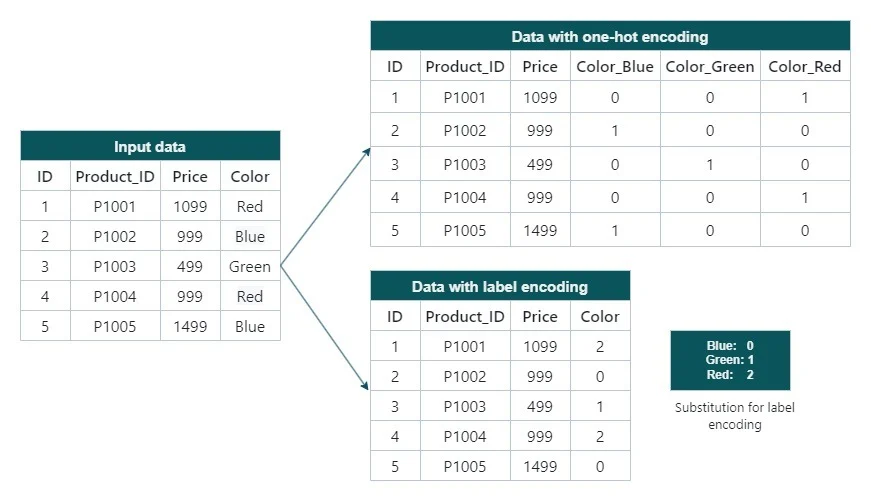
One-hot encoding vs. label encoding
Label encoding converts each unique categorical value into a unique integer. On the contrary, one-hot encoding creates a new binary column for each category. The category present in a particular row is set to 1, and other columns are set to 0. Due to this, both these techniques perform differently in different use cases.
- Type of categorical data: Label encoding works well for categorical data with an inherent order, such as course grades, education levels, military ranks, or clothing sizes. It also works well for categorical values that can be represented using theLikert scale. We just need to make sure that higher integers are assigned to the values that are higher in the order. One-hot encoding is best for nominal data that has no inherent order.
- Dimensionality of data: Label encoding is simple and space-efficient, as it doesn’t add extra columns to the data. One-hot encoding adds new columns to the data, increasing dimensionality and sparsity in the dataset. One-hot encoding can lead to high dimensionality if the categorical feature has many unique values.
- Compatibility with tree-based algorithms: Label encoding often works well using decision trees and ensemble algorithms like random forest models andxgboost. As tree-based algorithms don’t assume any relationship between the encoded integers, we get efficient models. On the other hand, one-hot encoding increases the dimensionality of the data, which might result in overfitting and increased complexity.
- Compatibility with distance-based algorithms: Algorithms like linear regression, logistic regression, and K-nearest neighbors assign a ranking or distance between two data points. Suppose we use label encoding to encode categorical values. For instance, when you substitute the colors Blue with 1, Green with 2, and Red with 3, the ML models understand this data as 3>2>1. The model might also deduce that Red is closer to Green and farther from Blue. These inferences are incorrect and can impact the model’s performance. One-hot encoding ensures that all the category values are at the same distance and equally different. There is no unintended hierarchy. Therefore, we should use one-hot encoding when distance calculations are required to process the data.
Conclusion
One-hot encoding is a fundamental technique for preparing categorical data for ML models. Transforming categories into binary vectors ensures that models treat each category equally without assuming any implicit order. Whether working with simple datasets or building complex ML pipelines, understanding when and how to apply one-hot encoding can make a real difference in your model’s performance and accuracy. In this article, we discussed the basics and implementation of one-hot encoding. We also discussed how one-hot encoding differs from label encoding and how we can use these techniques in different scenarios. You can take a sample dataset with different categorical columns and experiment with it to understand how one-hot encoding works in various scenarios.
To learn more about data preprocessing and analysis, you can take the courseLearn Data Analysis with Pandas. You might also like this skill path on how tobuild a machine-learning modelthat discusses building different ML models using the scikit-learn module.
FAQs
1. What is the purpose of OneHotEncoder?
OneHotEncoderconverts categorical variables into a numerical format that machine learning models can understand. It converts categorical features into binary vectors where each unique value is represented as a separate feature.
2. How to handle unseen data in one-hot encoding?
You can build an encoder with theOneHotEncoderclass in the sklearn module that ignores the unseen values. For that, you can set thehandle_unknownparameter to"ignore"while creating the encoder.
3. Should I scale or normalize one-hot encoded features?
Scaling one-hot encoded features is unnecessary because they’re already in binary format (0s and 1s).
4. What is sparse vs. dense one-hot encoding?
Sparse one-hot encoding stores only the positions of 1s to save memory. It is helpful for large datasets. Dense one-hot encoding keeps full vectors, which are easier to understand but use more memory. You can set thesparse_outputparameter toFalsefor dense one-hot encoding andTrueotherwise.
'The Codecademy Team, composed of experienced educators and tech experts, is dedicated to making tech skills accessible to all. We empower learners worldwide with expert-reviewed content that develops and enhances the technical skills needed to advance and succeed in their careers.'
Complete Payment to Unlock Full Guide & Source Code
You are viewing the 30% preview. Join TopCourseAI Pro to unlock the remaining 70% of this article, unblur all code snippets, and gain full access to all 412 technical projects and guides.
Ready to access the complete step-by-step tutorial?
Gain full unhindered access to all 412 technical projects and guides, unblur all source code snippets, and download runnable scripts.
What is LiteLLM and How to Use it
Next BlueprintWhat is OpenRouter? A Guide with Practical Examples
Related Blueprints & Guides
View all 166 →Decision Trees for Classification and Regression
Decision trees are a common type of machine learning model used for binary classification tasks. The natural structure of a binary tree lends itself well to predicting a “yes” or “no” target. It is traversed sequentially...
Machine learningFeature Importance
When we fit a supervised machine learning (ML) model, we often want to understand which features are most associated with our outcome of interest. Features that are highly associated with the outcome are considered more...
Machine learningHistory of Chatbots
In October of 1950, Alan Turing proposed an approach for evaluating a computer’s intelligence and famously named his method, The Imitation Game. The premise is that an interrogator talks to two people through a “typewrit...
Ready to build production-grade AI systems?
Enjoyed this guide? Continue exploring our library of 166+ production blueprints, multi-agent swarms, and autonomous agent systems with 100% unblurred, executable source code.