
Red, Green, Refactor
Red, Green, Refactor
Test-driven development(TDD) is an approach to software development where you write tests first, then use those tests to drive the design and development of your software application.
In this article, you will learn about a TDD approach calledred, green, refactor, a framework that developers use to build a test suite, write implementation code, and optimize their codebase in short development cycles.
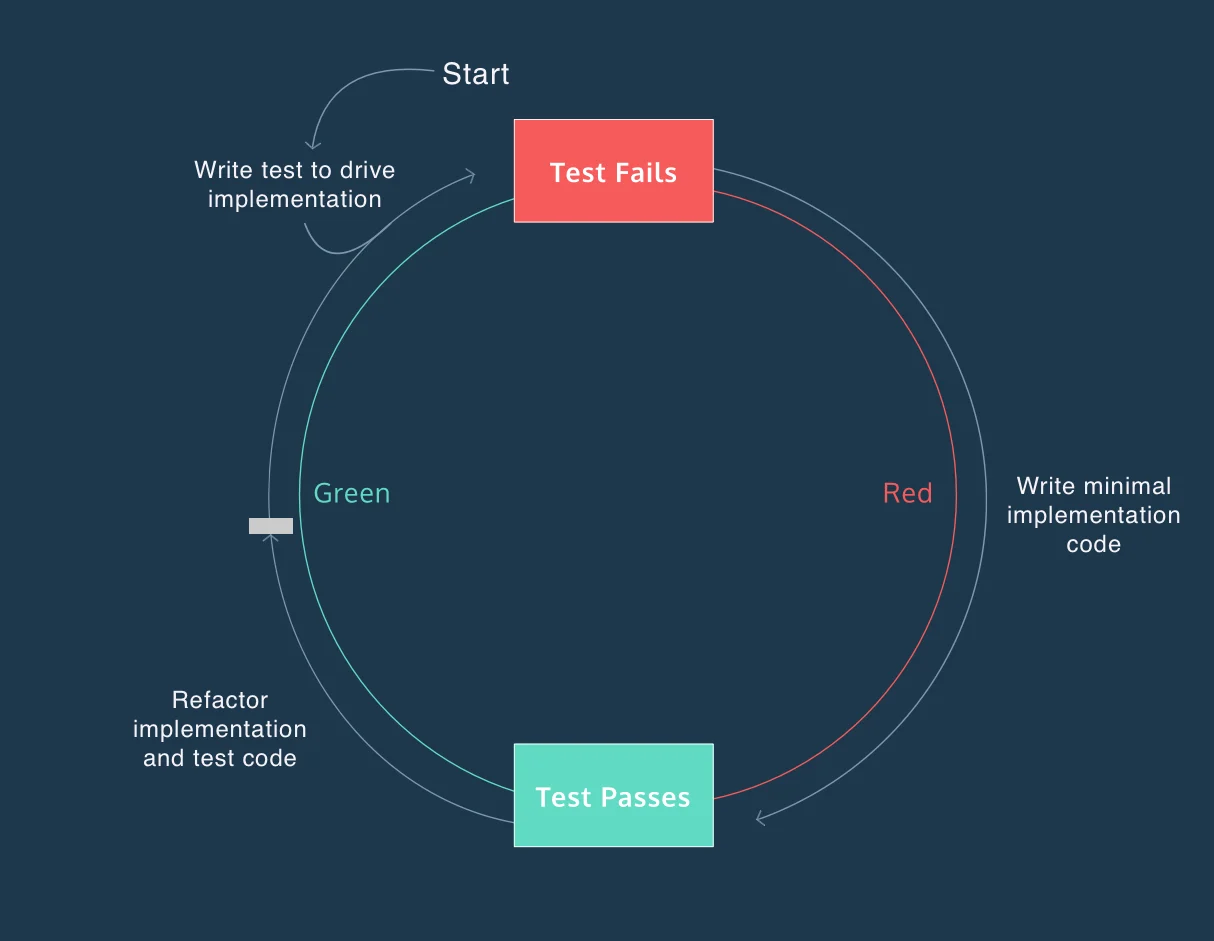
The red, green, refactor approach helps developers compartmentalize their focus into three phases:
- Red — think aboutwhatyou want to develop
- Green — think abouthowto make your tests pass
- Refactor — think abouthowto improve your existing implementation
Red, Green, Refactor
Refer to the diagram above, as you learn about the phases of the red, green, refactor TDD approach below:
The red phase is always the starting point of the red, green, refactor cycle. The purpose of this phase is to write a test that informs the implementation of a feature. The test will only pass when the its expectations are met.
For example, imagine you want to create a function calledsortArraythat sorts the numerical values of an array in ascending order. You may start by writing a test that checks the following input and output:
- Input:[2, 4, 1]
- Output:[1, 2, 4]
When you run this test, you may see an error message like:

Red, Green, Refactor
As you can see, the purpose of this phase was to define what you want to implement. The resulting error message from this test informs your approach to implementation. At this point, you are considered “in the red.”
The green phase is where you implement code to make your test pass. The goal is to find a solution, without worrying about optimizing your implementation.
In oursortArrayexample, the goal is to accept an array like[2, 4, 1]and return[1, 2, 4].
I decide to approach the problem by writing a loop that iterates over the array, and moves the current number over if it is larger than the number to the right. I nest this loop inside of a loop that repeats until all of the numbers are sorted (the length of the array). Sorting an array with[3, 4, 5, 6, 2, 1]would look like:
After I implement this, I should see a passing message that looks like:

Red, Green, Refactor
At the end of this phase, you are consider “in the green.” You can begin thinking about optimizing your codebase, while having a descriptive test if you do something wrong.
In the refactor phase, you are still “in the green.” You can begin thinking about how to implement your code better or more efficiently. If you are thinking about refactoring your test suite, you should always consider thecharacteristics of a good test, MC-FIRE. If you want to think about refactoring your implementation code, you can think about how to accomplish the same output with more descriptive or faster code.
Let’s take a moment to think about how I would approach refactoring mysortArrayfunction. After doing someresearch of sorting methods, I find that I implemented thebubble sort method, which, it turns out, is not a particularly fast sorting method.
I choose to change the method I use insortArray()to themerge sort algorithm, because it has a faster average sorting speed than bubble sort.
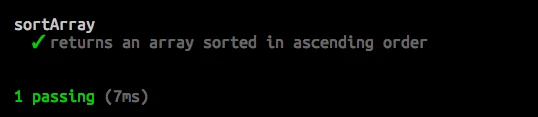
As I refactorsortArray(), I have the safety net of my test to notify me if my implementation goes off the tracks, and returns the wrong answer. When I complete my refactor and run my suite again, I receive the following output:
Red, Green, Refactor
Do you notice anything different about this output versus the output we received at the end of the green phase?
The new test code ran faster than before. The(7ms)next to1 passingis shorthand for seven milliseconds, the amount of time it takes to run the test. At the end of the green phase, our test suite took nineteen milliseconds. Although a twelve millisecond difference is trivial here, the amount of time it takes to run a test suite increases considerably as your codebase grows.
You may not always need to refactor your codebase. However when you’re in the green, it’s important to ask a few questions before putting yourself back “in the red”. Below is a list of questions you should ask yourself when you’re considering a refactor:
- Can I make my test suite more expressive?
- Does my test suite provide reliable feedback?
- Are my tests isolated?
- Can I reduce duplication in my test suite or implementation code?
- Can I make my implementation code more descriptive?
- Can I implement something more efficiently?
If you take time during the refactor stage to ask these questions, you will likely end up with a more complete, reliable, and fast piece of software.
In this article, you saw an example of how you can use TDD to improve confidence that your code is working as expected. You also saw how to use an existing test to keep you on track while you refactor implementation code.
If you use red, green, refactor TDD to approach large software implementation problems, you will find yourself saving time, while implementing a more robust solution than you otherwise would have.
'The Codecademy Team, composed of experienced educators and tech experts, is dedicated to making tech skills accessible to all. We empower learners worldwide with expert-reviewed content that develops and enhances the technical skills needed to advance and succeed in their careers.'
Complete Payment to Unlock Full Guide & Source Code
You are viewing the 30% preview. Join TopCourseAI Pro to unlock the remaining 70% of this article, unblur all code snippets, and gain full access to all 412 technical projects and guides.
Ready to access the complete step-by-step tutorial?
Gain full unhindered access to all 412 technical projects and guides, unblur all source code snippets, and download runnable scripts.
Rebrandly URL Shortener API
Next BlueprintRepresent Everyday Things with Objects
Related Blueprints & Guides
View all 166 →Accessibility on the Platform
Codecademy is committed to providing a high-quality learning experience for all learners. That includes accommodating different usage forms such as auditory, motor, or visual restrictions, limited hardware, or other acce...
Web developmentAffordances, Signifiers, and Clickability
For users on the web, the mouse click is perhaps the most fundamental human-computer interaction. The webbecamethe web partially through the power ofhypertext, or text in one document that links to other documents or res...
Web developmentAuthentication and OAuth
Authenticationis the process used by applications to determine and confirm identities of users. It ensures that the correct content is shown to users. More importantly, it ensures that incorrect content is secured and u...
Ready to build production-grade AI systems?
Enjoyed this guide? Continue exploring our library of 166+ production blueprints, multi-agent swarms, and autonomous agent systems with 100% unblurred, executable source code.