
MongoDB Data Modeling Basics
MongoDB Data Modeling Basics
Introduction
When working with databases, we typically are given a blank slate with regards to what data we want to store. However, one of our most important decisions is not just the data we store but also how the data will be organized. Recall that with MongoDB, as opposed to a relational database, we have the flexibility to organize our data without the constraint of a predefined schema. The absence of a schema-based structure means we will have to think even more deeply about how we will structure our data. This concept is calleddata modeling.
Data modeling as a practice is the process of developing and choosing a way to structure our data and its relationships. The way we choose to organize our data has long-lasting implications on a database’s scalability, maintainability, and performance. In this article, we will explore the techniques and processes behind data modeling in MongoDB. Specifically, we will:
- Discuss what it means to model data in a database and why it is important.
- Explore the two fundamental ways of representing relationships between data in MongoDB: embedded documents and references.
- Think through three data modeling case studies.
Let’s get started!
The Importance of Data Modeling
A data model is like a blueprint for our data. A good data model can provide structure and organization to what might be a diverse and complex set of information. A bad model can make even simple data challenging to work with.
Imagine, for instance, that we decide to use MongoDB to store information about our photography business. We want to store a few things: the name of the event we’re photographing, the location, and the client’s name. This data is relatively simple, but consider how two different ways of modeling it could change our database’s usability and efficiency.
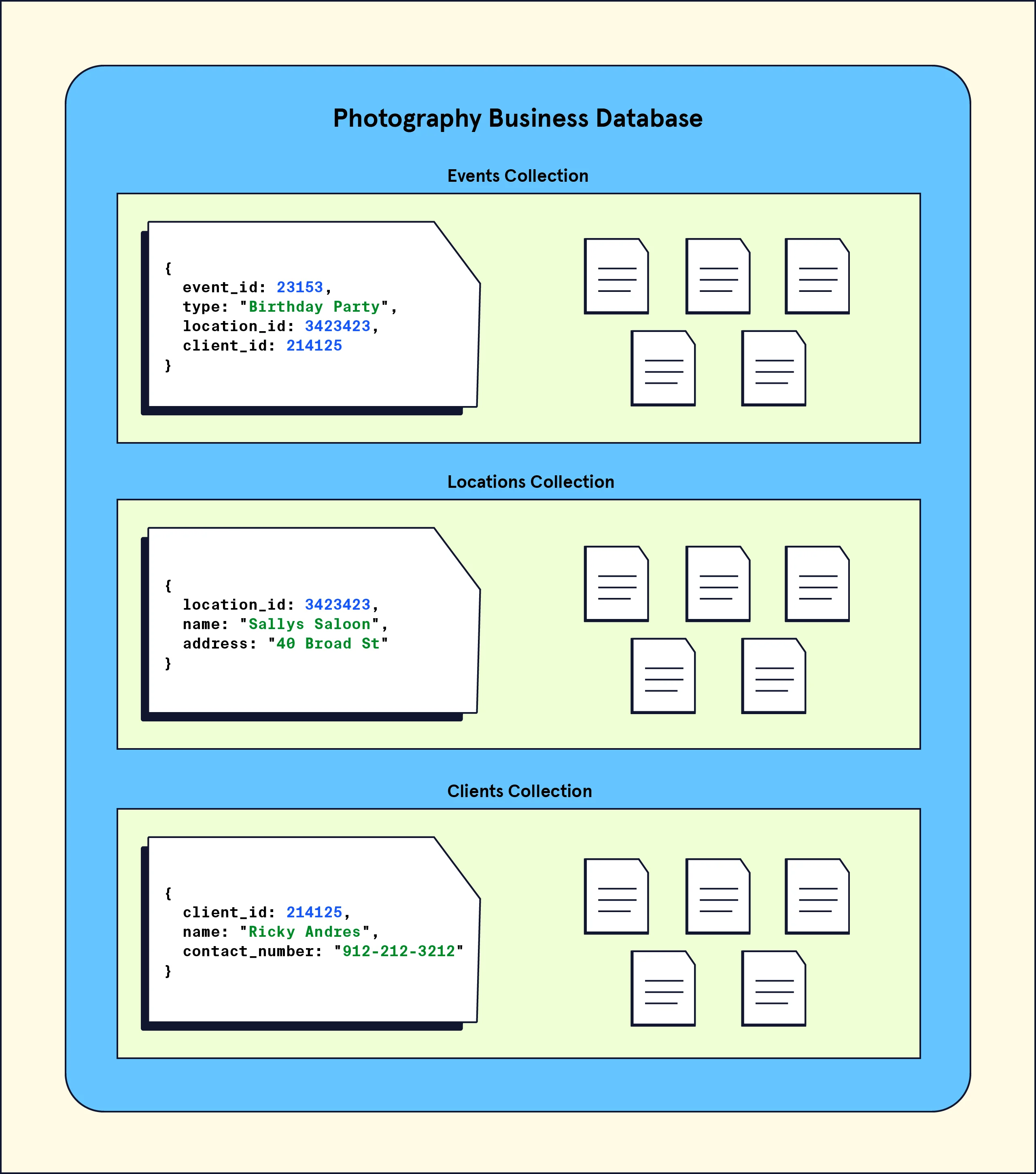
First, let’s examine Model A:
MongoDB Data Modeling Basics
In this model, we have three collections, one for the event details, one for the locations, and one for our clients. Each event corresponds to three documents in three separate collections. Our events document has a record of which location and client are related to the event via thelocation_idandclient_idfields.
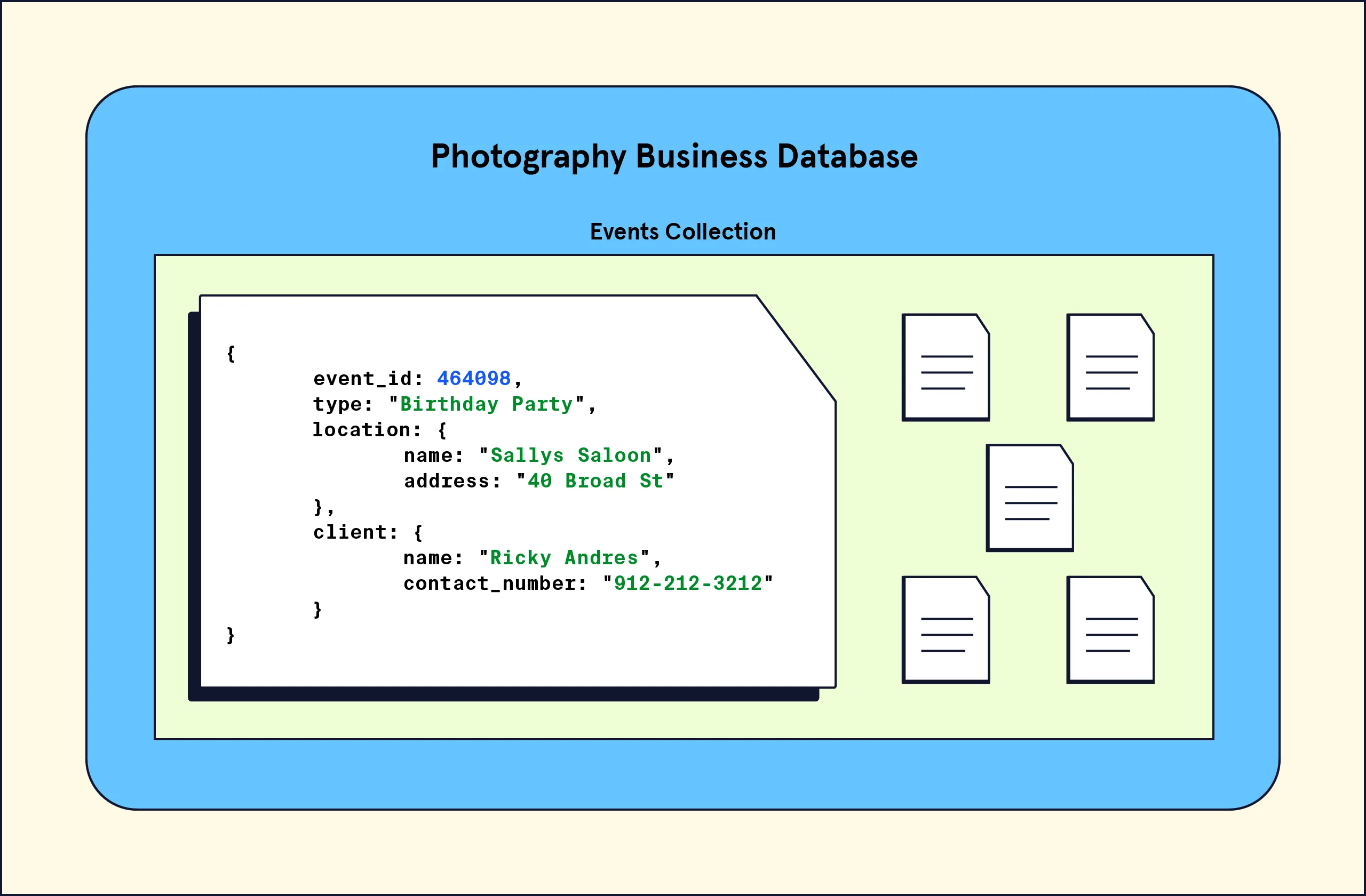
Alternatively, we have Model B:
MongoDB Data Modeling Basics
In this model, we have one collection, aneventscollection, which has documents each containing three fields corresponding to theevent, thelocation, and theclient. The data is all nested into a single document.
Each of these models offers its unique benefits and drawbacks. Here is a breakdown of each:
- Model A: This modelmightoffer better data integrity. This is because data can be shared across multiple collections instead of being duplicated. For example, we have a single location record in the location collection that multiple events can reference. Additionally, because we are not duplicating records, the overall usage of storage can be lower compared to Model B. However, as previously mentioned, this model will likely take longer to query because we need to query three different collections to gather data.
- Model B: This modelmightoffer performance benefits. Any query for a single event will take less time (and likely developer effort) than Model A since we only have to query one collection. As more and more documents get added, this model would see positive performance implications. However, this model would have a higher occurrence of duplicated data. This is because each of the fields (e.g., location) is not shared across multiple collections. So, for example, if we had a popular location (e.g. “Niagara Falls”) that was used across multiple events, we might have multiple copies of that value across multiple documents.
In essence, choosing a data model suited for our data and application is essential for any developer. Every application is unique and may even require us to refactor our data model later down the line as the requirements of the database change.
Modeling Relationships in MongoDB
In addition to deciding the overall structure of our collections, another consideration is how to represent relationships between data. First, let’s think about why relationships between data are important. Take the example of a database that stores data about cars.
A document containing information about a car will likely have information like the color and size, which are attributes of the car itself. However, it may also contain information about the car’s engine.
The engine, being its own entity, possesses attributes separate from the overall car. If we want to store data about how powerful the engine is, it wouldn’t then seem quite right to makeengine_poweran attribute of the car since it is an attribute of the engine instead. In addition, we would have to ponder what the relationship between the car data and the engine are in the context of our whole database. We might ask, “Is the engine being shared amongst other cars in our database, or does it belong to only a single car?”
Our data modeling challenge would be to decide how best to represent the engine as a separate entity, its relationship to the car, and it’s relationship across the collection. To establish these types of relationships in MongoDB, we have two options: embedded documents or references. Let’s explore each of these options!
Embedded documents
One way to establish a relationship in MongoDB is to use embedded documents. This method allows us to nest data related to a document directly inside of it! These nested documents are calledsub-documents. We already saw an example of this style when we looked at Model B of the photography database (feel free to pause and take a look again). Here is our car and engine example, modeled with an embedded document:
// Car Document{  car_id: 48273  model_name: "Corvette",  engine: {    engine_power: 490,    engine_type: "V8",    acceleration: "High"  }}
Copy to clipboard
// Car Document{ car_id: 48273 model_name: "Corvette", engine: { engine_power: 490, engine_type: "V8", acceleration: "High" }}In the above example, notice how the engine data is nested inside the car document. This type of data model where we find related data lumped together into a single collection is known as adenormalizeddata model.
Additionally, the following scenarios are good use-cases for embedded documents:
- Modeling relationships where one entitycontainsanother, also known as aone-to-onerelationship. For example, we can think of a database storing data with a relationship between a car and its unique license plate. Each record of a car has only one license plate.
- Modeling relationships that map one entity to many sub-entities, also known as anone-to-manyrelationship. For example, we can think of a database storing data with a relationship between a car owner and their multiple-owned cars. Each record of a car owner can own multiple instances of a car.
References
In addition to embedded documents, we can define relationships by creating links between data. These links are called references. Using references, we can split our data into multiple documents and maintain their relationships. We already saw an example of this style when we looked at Model A of the photography database (feel free to pause and take a look again). Here is our car and engine example, modeled with references:
//Car Document{  car_id: 48273  model_name: "Corvette",  engine_id: 2165}
// Engine Document{  id: 2165  engine_power: 490,  engine_type: "V8",  acceleration: "High"}
Copy to clipboard
//Car Document{ car_id: 48273 model_name: "Corvette", engine_id: 2165}
// Engine Document{ id: 2165 engine_power: 490, engine_type: "V8", acceleration: "High"}In the above illustration, notice how the engine data is in a separate collection but is linked (viaengine_id) into thecarcollection. This type of data model where we find related data via a link is known as anormalizeddata model and typically mimics how a relational database creates relationships between data.
Additionally, the following scenario is a good use case for references:
- Modeling relationships where many instances of one entity can be mapped to many instances of another entity, also known asmany-to-manyrelationships. For example, we can think of the relationship between car rentals and individuals renting the cars. A car can be rented by multiple individuals, and an individual can rent multiple cars.
Choosing The Right Model
Choosing between references and embedded documents can be tricky. Let’s consider three cases where we have to choose between an embedded or a reference-based model. For each case, try to first consider whether we would use references or embedded documents to model the relationships between the data.
In this case, since we can only have one person assigned to each task, we are modeling a one-to-one relationship. Assuming we will often need the data for the user in addition to the task details, itmightbe preferable to use an embedded document since the information can be retrieved together in one query. Here is what our document might look using an embedded document:
{  task: "Review Rough Outline",  due: "2022/09/03 09:00",  assignee: {    name: "Alex",    role: "SME",    contact: "alex@example.com"  }}
Copy to clipboard
{ task: "Review Rough Outline", due: "2022/09/03 09:00", assignee: { name: "Alex", role: "SME", contact: "alex@example.com" }}In this case, since a single user can have multiple associated addresses, we are modeling a one-to-many relationship. There are two distinct ways we can implement the data model.
First, we could use embedded documents. Our documents might look something like this:
{  first_name: "Alex",  last_name: "Smith",  addresses: [    { label: "home", value: { address: "123 4th Street", city: "Toronto", region: "ON", country: "Canada", postcode: "M1S 2J8" } },    { label: "work", value: { address: "1633 Broadway 38th floor", city: "New York", region: "NY", country: "USA", postcode: "10019" } },    "  ]}
Copy to clipboard
{ first_name: "Alex", last_name: "Smith", addresses: [ { label: "home", value: { address: "123 4th Street", city: "Toronto", region: "ON", country: "Canada", postcode: "M1S 2J8" } }, { label: "work", value: { address: "1633 Broadway 38th floor", city: "New York", region: "NY", country: "USA", postcode: "10019" } }, " ]}The embedded documents model above would be preferable if we are making many queries on theaddressesfield since we would only need to query a single document to receive our results. However, if we later down the line had many instances of users sharing an address, we might end up with the following collection:
{  first_name: "Alex",  last_name: "Smith",  addresses: [    { label: "home", value: { address: "123 4th Street", city: "Toronto", region: "ON", country: "Canada", postcode: "M1S 2J8" } },    { label: "work", value: { address: "1633 Broadway 38th floor", city: "New York", region: "NY", country: "USA", postcode: "10019" } }  ]},{  first_name: "Josh",  last_name: "Gold",  addresses: [    { label: "home", value: { address: "123 4th Street", city: "Toronto", region: "ON", country: "Canada", postcode: "M1S 2J8" } }    "  ]},{  first_name: "Timbo",  last_name: "Gray",  addresses: [    { label: "home", value: { address: "123 4th Street", city: "Toronto", region: "ON", country: "Canada", postcode: "M1S 2J8" } }  ]}
Copy to clipboard
{ first_name: "Alex", last_name: "Smith", addresses: [ { label: "home", value: { address: "123 4th Street", city: "Toronto", region: "ON", country: "Canada", postcode: "M1S 2J8" } }, { label: "work", value: { address: "1633 Broadway 38th floor", city: "New York", region: "NY", country: "USA", postcode: "10019" } } ]},{ first_name: "Josh", last_name: "Gold", addresses: [ { label: "home", value: { address: "123 4th Street", city: "Toronto", region: "ON", country: "Canada", postcode: "M1S 2J8" } } " ]},{ first_name: "Timbo", last_name: "Gray", addresses: [ { label: "home", value: { address: "123 4th Street", city: "Toronto", region: "ON", country: "Canada", postcode: "M1S 2J8" } } ]}In this situation, where we notice that embedded documents are starting to repeat, we may consider using references instead. By using references, our collection could look like this instead:
Addresses Collection:
// Addresses Collection{  _id: 123456789  address: { 	    street: "123 4th Street",     city: "Toronto",     region: "ON",     country: "Canada",     postcode: "M1S 2J8"   }},{   _id: 9292944,  address: {     street: "1633 Broadway 38th floor",    city: "New York",     region: "NY",     country: "USA",     postcode: "10019"   } }
Copy to clipboard
// Addresses Collection{ _id: 123456789 address: { street: "123 4th Street", city: "Toronto", region: "ON", country: "Canada", postcode: "M1S 2J8" }},{ _id: 9292944, address: { street: "1633 Broadway 38th floor", city: "New York", region: "NY", country: "USA", postcode: "10019" } }User Collection:
// User Collection {  first_name: "Alex",  last_name: "Smith"  addresses: [ 123456789, 9292944 ] },{  first_name: "Josh",  last_name: "Gold",  addresses: [ 123456789 ] },{  first_name: "Timbo",  last_name: "Gray",  addresses: [ 123456789 ]}
Copy to clipboard
// User Collection { first_name: "Alex", last_name: "Smith" addresses: [ 123456789, 9292944 ] },{ first_name: "Josh", last_name: "Gold", addresses: [ 123456789 ] },{ first_name: "Timbo", last_name: "Gray", addresses: [ 123456789 ]}Notice how the user documents include an array field namedaddressesthat stores the unique id of the address document thus avoiding the repetition of each individual address. While the above example shows one case where wemightuse references, its important to note that we need to consider how frequently we are accessing the address information and how large it is before making a data modeling decision.
In this application, we have many students sharing a relationship with many classes. Here, we need to model a many-to-many relationship. In this case, referencesmightbe preferred. Our collections would look similar to this:
Students Collection:
// Students Collection{	   _id: 1,   name: "Alex",  average_grade: 3.9,   course_ids: [ 1, 2, 4 ] },{  _id: 2,   name: "Bob",   average_grade: 2.4,   course_ids: [ 3, 4 ] }
Copy to clipboard
// Students Collection{ _id: 1, name: "Alex", average_grade: 3.9, course_ids: [ 1, 2, 4 ] },{ _id: 2, name: "Bob", average_grade: 2.4, course_ids: [ 3, 4 ] }Classes Collection:
// Classes Collection{   _id: 1,   name: "Intro to MongoDB",   student_ids: [ 1 ] },{	   _id: 2,   name: "Programming 101",   student_ids: [ 1 ] },{ 	  _id: 3,   name: "Networking Concepts",   student_ids: [ 2 ] },{ 	  _id: 4,   name: "Understanding Distributed Systems",   student_ids: [ 1, 2 ] }
Copy to clipboard
// Classes Collection{ _id: 1, name: "Intro to MongoDB", student_ids: [ 1 ] },{ _id: 2, name: "Programming 101", student_ids: [ 1 ] },{ _id: 3, name: "Networking Concepts", student_ids: [ 2 ] },{ _id: 4, name: "Understanding Distributed Systems", student_ids: [ 1, 2 ] }Wrap Up
In this article, we learned about the importance of data modeling. We also touched on two ways to model relationships with our MongoDB data. Let’s take a moment to review what we’ve learned:
- Data modeling is the practice of developing an organizational structure for the data in our database.
- Choosing a data model can have lasting implications on the database and its long-term performance, maintainability, and usability.
- Embedded documents and references are two of the most common ways to model data. These two methods help define the relationships between the data in collections.
- Reference-based data models are normalized; they use links inside of the data (typically via the_idfield) to create relationships.
- Embedded data models are denormalized; they use nested documents inside of collections to create relationships.
Properly modeling our data can ensure our database stores information efficiently, keeping our data organized and usable. If you’d like to learn more about data modeling in MongoDB, check out these helpful resources:
- Article:Data Modeling Introduction
- Documentation:Model One-to-One Relationships with Embedded Documents
- Documentation:Model One-to-Many Relationships with Embedded Documents
- Documentation:Model One-to-Many Relationships with References
- Course:MongoDB University Data Modeling Course
'The Codecademy Team, composed of experienced educators and tech experts, is dedicated to making tech skills accessible to all. We empower learners worldwide with expert-reviewed content that develops and enhances the technical skills needed to advance and succeed in their careers.'
Complete Payment to Unlock Full Guide & Source Code
You are viewing the 30% preview. Join TopCourseAI Pro to unlock the remaining 70% of this article, unblur all code snippets, and gain full access to all 412 technical projects and guides.
Ready to access the complete step-by-step tutorial?
Gain full unhindered access to all 412 technical projects and guides, unblur all source code snippets, and download runnable scripts.
Related Blueprints & Guides
View all 166 →Accessibility on the Platform
Codecademy is committed to providing a high-quality learning experience for all learners. That includes accommodating different usage forms such as auditory, motor, or visual restrictions, limited hardware, or other acce...
Web developmentAffordances, Signifiers, and Clickability
For users on the web, the mouse click is perhaps the most fundamental human-computer interaction. The webbecamethe web partially through the power ofhypertext, or text in one document that links to other documents or res...
Web developmentAuthentication and OAuth
Authenticationis the process used by applications to determine and confirm identities of users. It ensures that the correct content is shown to users. More importantly, it ensures that incorrect content is secured and u...
Ready to build production-grade AI systems?
Enjoyed this guide? Continue exploring our library of 166+ production blueprints, multi-agent swarms, and autonomous agent systems with 100% unblurred, executable source code.